Why Your Laptop GPU Will Never Work with Proxmox Passthrough
Six attempts, three days, one stubborn MX330. A post-mortem on laptop GPU passthrough in Proxmox — what failed, why it's architecturally impossible, and exactly what to buy instead.
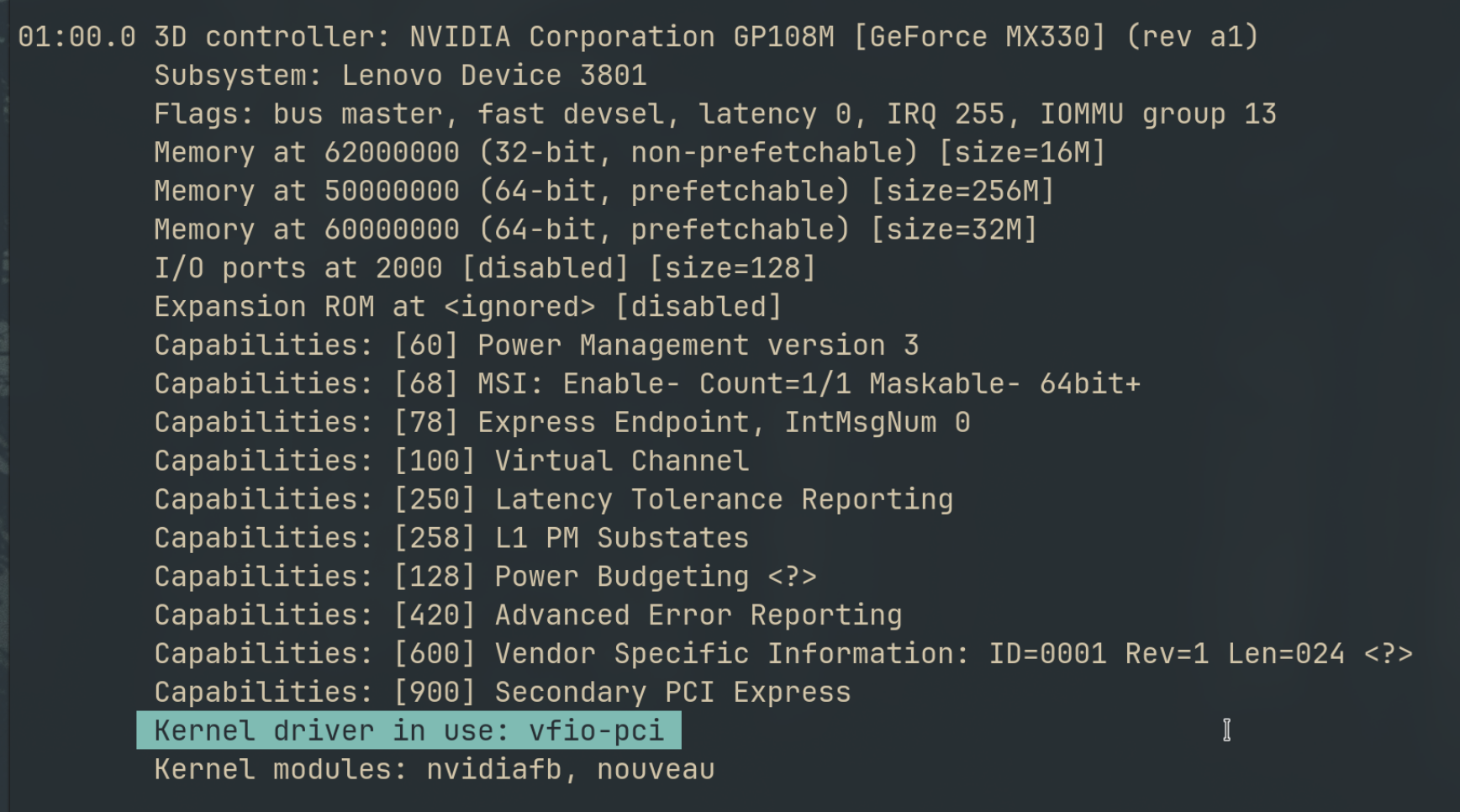
Every guide on GPU passthrough makes it look straightforward. Enable IOMMU, bind VFIO, pass the PCI device to the VM, install the driver. Done.
What none of those guides mention — in the title, the introduction, or anywhere obvious — is that every single one of them was written for a desktop GPU. If you are sitting in front of a laptop wondering why your MX330, MX450, or any other mobile NVIDIA GPU refuses to initialize inside a Proxmox VM, this post is for you.
I spent three days on this. Six distinct attempts. Here is exactly what happened, why it failed, and what you need to know before you waste the same time.
The Setup
I built a Proxmox home lab on an old laptop. Here is the exact hardware:
iGPU:  Intel Iris Plus Graphics G7  [8086:8a52]  (Ice Lake GT2, rev 07)
dGPU:  NVIDIA GP108M GeForce MX330  [10de:1d16]  (rev a1)
CPU:   Intel Core i7-1065G7 @ 1.30GHz (4C/8T, up to 3.9GHz)
The goal: pass the MX330 through to an Ubuntu VM and run local AI models with Ollama and CUDA.
The VM config (/etc/pve/qemu-server/101.conf):
name: nvidia
machine: q35
bios: ovmf
cpu: host
cores: 1
sockets: 1
memory: 2048
ostype: l26

efidisk0: local-lvm:vm-101-disk-0,efitype=4m,size=4M
scsi0: local-lvm:vm-101-disk-1,iothread=1,size=32G
scsihw: virtio-scsi-single

hostpci0: 01:00,pcie=1
net0: virtio=XX:XX:XX:XX:XX:XX,bridge=vmbr0,firewall=1
vga: virtio
agent: 1
The host configuration was correct from the start:
# /etc/default/grub
GRUB_CMDLINE_LINUX_DEFAULT="quiet intel_iommu=on iommu=pt"
# /etc/modprobe.d/vfio.conf
options vfio-pci ids=10de:1d16
softdep nouveau pre: vfio-pci
softdep nvidia pre: vfio-pciThe GPU was in its own isolated IOMMU group — no ACS issues, no sharing with other devices. VFIO bound to it cleanly. The VM could see the GPU in lspci. Everything looked right.
Then I tried to load the NVIDIA driver inside the VM.
The Error That Doesn’t Go Away
NVRM: GPU 0000:01:00.0: Failed to copy vbios to system memory.
NVRM: GPU 0000:01:00.0: RmInitAdapter failed! (0x30:0xffff:988)
NVRM: GPU 0000:01:00.0: rm_init_adapter failed, device minor number 0nvidia-smi: No devices were found.
The driver loads. The GPU is visible. But initialization fails every time, at exactly the same line.
Six Attempts, One Conclusion
Attempt 1–5: Everything the Forums Suggest
Every attempt below produced the same output from dmesg | grep NVRM — the driver loading, trying, and failing three times without moving a single line further:
[    6.586721] NVRM: loading NVIDIA UNIX x86_64 Kernel Module  470.256.02  Thu May  2 14:37:44 UTC 2024
[    6.682795] NVRM: GPU 0000:01:00.0: Failed to copy vbios to system memory.
[    6.683274] NVRM: GPU 0000:01:00.0: RmInitAdapter failed! (0x30:0xffff:874)
[    6.684286] NVRM: GPU 0000:01:00.0: rm_init_adapter failed, device minor number 0
[   20.165393] NVRM: GPU 0000:01:00.0: Failed to copy vbios to system memory.
[   20.165734] NVRM: GPU 0000:01:00.0: RmInitAdapter failed! (0x30:0xffff:874)
[   20.166039] NVRM: GPU 0000:01:00.0: rm_init_adapter failed, device minor number 0
[   20.369707] NVRM: GPU 0000:01:00.0: Failed to copy vbios to system memory.
[   20.369819] NVRM: GPU 0000:01:00.0: RmInitAdapter failed! (0x30:0xffff:874)
[   20.369971] NVRM: GPU 0000:01:00.0: rm_init_adapter failed, device minor number 0
Three retries. Same failure. The driver is not confused about what went wrong — it knows exactly where it is stuck.
| Fix | What it does | Result |
|---|---|---|
rombar=1 on hostpci | Expose ROM BAR to VM | Same vBIOS error |
efi_fake_mem=256M in GRUB | Reserve memory for EFI | Same vBIOS error |
| 64GB MMIO window in VM args | Widen memory-mapped IO | Same vBIOS error |
Remove x-vga=on | Different VGA handling | Same vBIOS error |
NVreg_EnablePCIeGen3=1 | Force PCIe Gen 3 | Same vBIOS error |
nvidia-driver-535 | Newer driver version | Same vBIOS error |
nvidia-driver-470-server | Server-optimised driver | Same vBIOS error |
The error code in RmInitAdapter fluctuated slightly between runs (0x30:0xffff:988, 0x30:0xffff:874) but the failure point never moved. The vBIOS copy fails before the driver gets anywhere near initialization.
Every fix above addresses the wrong problem. They are solutions for desktop GPUs. The MX330 is not a desktop GPU.
Attempt 6: intel_iommu=igfx_off
Research surfaced an insight: romfile= and rombar are irrelevant for this error class. The root cause is different.
Mobile NVIDIA GPUs on Optimus laptops do not expose their vBIOS over the PCIe ROM BAR the way desktop GPUs do. Instead, the NVIDIA driver makes ACPI _ROM method calls back to the system firmware to retrieve the vBIOS. In a VM, there is no such ACPI entry. The firmware tables the driver is looking for do not exist in the virtual environment. That is why the copy fails, and no PCIe-level fix touches it.
The intel_iommu=igfx_off parameter excludes the Intel iGPU from IOMMU translation — a potential way to unblock DMA paths that might interfere with the ACPI vBIOS read:
GRUB_CMDLINE_LINUX_DEFAULT="quiet intel_iommu=on,igfx_off iommu=pt"Note the syntax: intel_iommu=on,igfx_off — not igfx_off as a standalone parameter. The standalone version is silently ignored by the kernel.
On the very first VM cold start after applying this, the vBIOS error disappeared. The driver loaded past that line:
NVRM: loading NVIDIA UNIX x86_64 Kernel Module  470.256.02
nvidia-modeset: Loading NVIDIA Kernel Mode Setting Driver
[drm] [nvidia-drm] [GPU ID 0x00000100] Loading driver
[drm:nv_drm_load] *ERROR* Failed to allocate NvKmsKapiDevice   ← new error
nvidia-uvm: Loaded the UVM driver, major device number 235.
Progress — but nvidia-smi still returned no devices. And on every subsequent VM start, the vBIOS error came back. The fix was not reproducible.
I also tried blacklisting the Intel i915 driver on the host entirely, thinking it might be locking the ACPI path once fully initialized. Same result — the vBIOS copy fails regardless of whether i915 is loaded.
Why This Is Not a Software Problem
The MX330 is a muxless Optimus GPU. Understanding what that means explains everything:
Muxless: There is no hardware multiplexer between the iGPU and dGPU. All display output routes exclusively through the Intel iGPU. The NVIDIA GPU has no physical display connectors of its own.
Optimus: NVIDIA’s power management architecture for laptops. The dGPU powers down when not in use. The iGPU handles all display rendering. The dGPU offloads compute when needed, renders, then hands the framebuffer back to the iGPU for display.
This creates two stacked, unfixable problems in a passthrough context:
Problem 1 — vBIOS delivery: Desktop GPUs store their vBIOS in a flash chip on the card, readable over PCIe at any time. Muxless laptop GPUs do not work this way. Their vBIOS is delivered by the laptop’s UEFI firmware via ACPI _ROM method calls — a mechanism that assumes a physical machine with a specific ACPI namespace. A VM has neither. No software workaround can fabricate the ACPI tables that the firmware would have provided.
Problem 2 — No display output: Even if the driver initialized, the GPU has nowhere to send video. The physical display ports on your laptop chassis are wired to the Intel iGPU, not the NVIDIA GPU. This means even in a success scenario, you would need Looking Glass (a shared memory framebuffer approach) or run the GPU completely headless for compute only.
Both problems are architectural. They are not bugs in Proxmox, VFIO, or the NVIDIA driver.
What Actually Works
Desktop discrete GPUs do not have either of these problems. Their vBIOS is on the card, readable over standard PCIe ROM BAR. They have their own physical display outputs. Passthrough is well-documented and reliable.
If you want GPU passthrough in your Proxmox home lab, these are the GPUs worth buying:
| GPU | Approximate Price | Notes |
|---|---|---|
| NVIDIA GT 1030 | ~$30 | Lowest cost entry, good for compute experiments |
| NVIDIA GTX 1050 | ~$40 | More CUDA cores, still cheap used |
| NVIDIA GTX 1650 | ~$50 | Good balance of price and capability |
| NVIDIA RTX 3060+ | $100+ | Serious compute, runs Ollama models comfortably |
| Any AMD RX 500+ | $30–80 | Open-source driver, often easier passthrough |
The rule: desktop GPU, full-height PCIe card, discrete power connector if available. If the GPU came inside a laptop, assume it will not work until proven otherwise.
The One Remaining Path (And Why I Did Not Take It)
There is a documented approach for muxless Optimus passthrough that goes further than anything above:
- Extract the vBIOS binary from a running Windows or Fedora install (while the native NVIDIA driver has it loaded)
- Compile a custom ACPI SSDT that injects an
_ROMmethod pointing to that binary - Inject it at QEMU startup via
fw_cfgin the VM’sargs:config
This has worked on a small number of higher-end mobile GPUs (GTX 1060 Mobile, in one documented case). It has no documented success on GP108M class GPUs — MX330, MX250, MX150. The complexity is significant: hand-compiled ACPI tables, binary vBIOS extraction, QEMU command-line arguments that Proxmox’s web UI does not expose.
For a GPU in the “$0 because I already had it” tier, the effort-to-reward ratio does not compute. A GT 1030 costs less than an afternoon.
What This Cost Me vs What It Would Have Cost to Research First
Three days. Six kernel reboots. A VM named “nvidia” sitting in my Proxmox cluster doing nothing.
The answer was in the hardware specification the whole time: GP108M is a mobile variant of the Pascal architecture. Mobile. Not desktop. That single word is the entire reason nothing worked.
GPU passthrough compatibility is documented. The VFIO community maintains lists. AMD’s open-source driver stack is generally friendlier than NVIDIA’s for passthrough. For NVIDIA, the rule is simple: if it came in a laptop, research it before committing hours to configuration.
Your laptop is already doing the hard work of being a Proxmox host. Let a $40 desktop GPU do the compute.
This post came out of building a Proxmox home lab from scratch on an old laptop. If you are setting that up, start with the full guide →

Other posts
See all posts
Your Old Laptop Is a Linux Server: A Complete Proxmox Home Lab Setup Guide
Turn an old laptop into a full Proxmox home server — Wi-Fi NAT routing, DHCP, MTU fixes, and every gotcha you'll actually hit. A practical guide that also teaches you how AWS works.
Quantum Computing for the Curious Developer: Building Your First Circuits with Qiskit
A developer's hands-on guide to quantum computing fundamentals — from qubits and gates to building a quantum teleportation circuit, no physics degree required.
When localhost Lied to Me: Debugging Playwright in a Containerized CI Runner
A Docker networking war story — why localhost lies inside containers, how --add-host gets you close, and how socat bridges the final gap for Playwright E2E tests.