The Kubelet Config Rabbit Hole That Changed How I Size Kubernetes Nodes
I went down a rabbit hole figuring out why my nodes had less resources than expected. Here's everything I learned about kubelet reservations, the allocatable formula, and drop-in configs.

How I Fell Into This Rabbit Hole
I was working on a kubmin feature that analyses your cluster workloads and suggests a better-fitting instanceType based on cost and resource fit. The core idea: compute a fitScore for each candidate VM — how well does its allocatable capacity match what your pods actually need, at the lowest cost?
Sounds straightforward until you realize “allocatable capacity” isn’t just the VM’s raw CPU and memory. The kubelet silently carves out a chunk for itself, the OS, and eviction safety margins before the scheduler ever sees it. If you don’t account for these reservations when computing the fitScore, you end up recommending instance types that look perfect on paper but can’t actually run the workload. One rabbit hole later, and here we are.
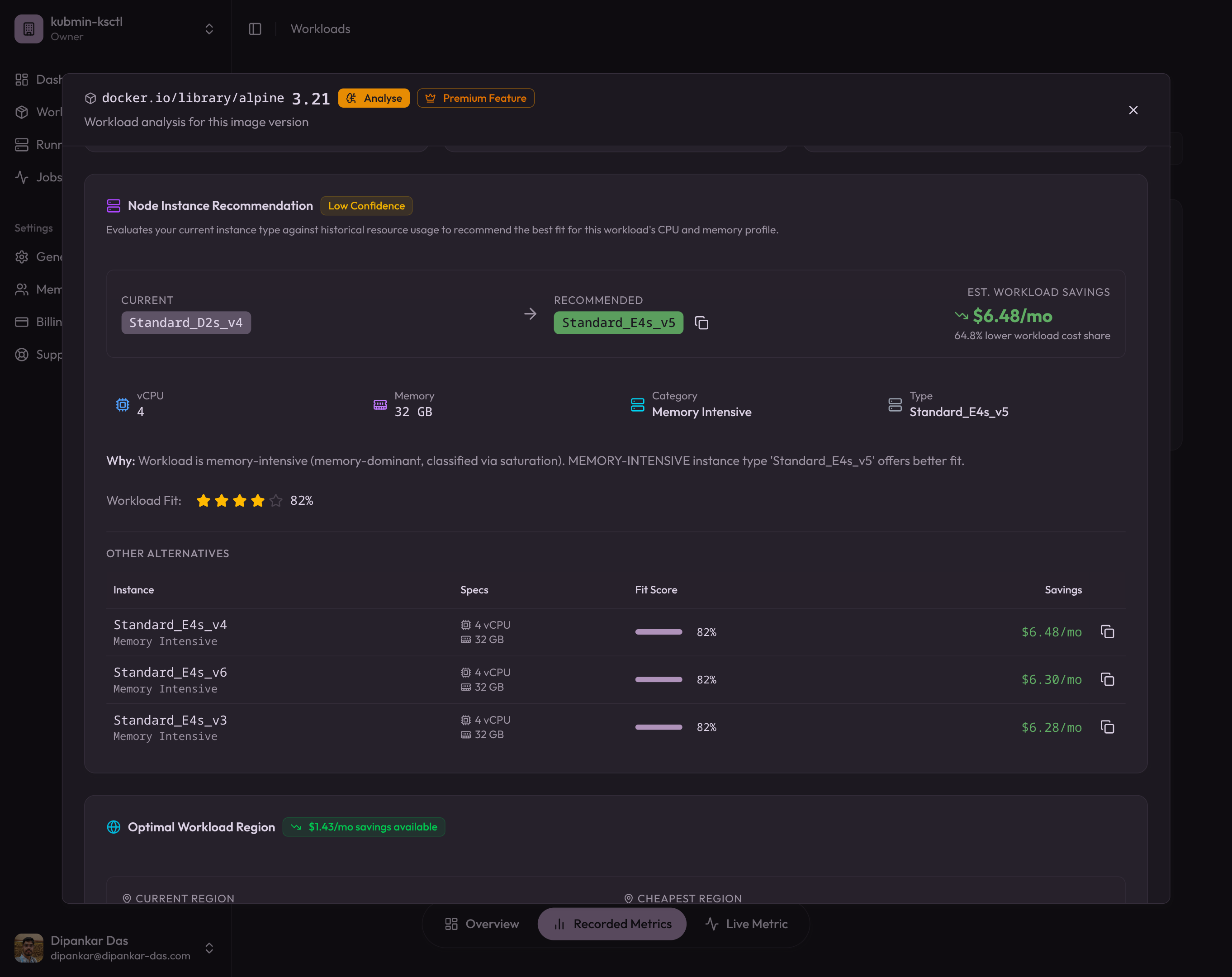
Not all of a node’s CPU and memory is available for your pods. The kubelet reserves a chunk for itself and the OS. On self-managed clusters (kubeadm), these reservations propagate uniformly to all nodes, which breaks down when you have mixed instance types. The fix: kubelet drop-in config directory (GA in Kubernetes v1.35) for per-node tuning.
Core Concepts
What are Kubernetes Available Resources?
Every cloud provider (Azure, AWS, GCP) runs your Kubernetes cluster on Virtual Machines. Each VM has a Capacity — the total CPU, memory, and other resources it provides. But not all of that capacity is available for your pods.
The available resources (what Kubernetes calls Allocatable) are what’s left after the kubelet reserves resources for itself, the OS, and eviction safety margins. This number is what the scheduler actually uses when deciding where to place pods — alongside filters like nodeSelector, affinity, and taints and tolerations.
The Allocatable Formula
Not all of a node’s capacity is available for your pods. The kubelet carves out resources for itself and the OS before the scheduler ever sees them. The formula is:
Allocatable = Capacity - kubeReserved - systemReserved - evictionThresholdThe kubelet exposes three reservation knobs:
-
kubeReserved— Resources reserved for Kubernetes system daemons: kubelet, container runtime, and node-level agents. This scales with node size because more pods means more kubelet overhead (more cgroups, more API watches, more container runtime bookkeeping). -
systemReserved— Resources reserved for OS-level daemons: sshd, journald, systemd, udev. Mostly fixed regardless of node size since these services don’t scale with pod count. -
evictionHard— Thresholds that trigger pod eviction when available resources fall below a limit. For example,memory.available: "100Mi"means the kubelet starts evicting pods when free memory drops below 100 MiB.
If Allocatable is too high (under-reserved), the scheduler packs more pods than the node can safely handle — risking OOM kills and node instability. If Allocatable is too low (over-reserved), you waste money on idle capacity. Getting these numbers right is the difference between a stable cluster and a 3am pager alert.
You can check this on any node:
kubectl describe node <node-name> | grep -A 10 "Allocatable"Compare Allocatable against Capacity. The difference should roughly equal kubeReserved + systemReserved + evictionThreshold.
Why One-Size-Fits-All Kubelet Config Breaks on Mixed Clusters
When you run kubeadm init, kubeadm creates a kubelet-config ConfigMap in the kube-system namespace. This ConfigMap holds the cluster-wide KubeletConfiguration and is the source of truth for every node that joins via kubeadm join. The joining kubelet downloads this ConfigMap and writes it to /var/lib/kubelet/config.yaml.
This works well when every node has the same hardware profile. But in practice, clusters are heterogeneous. You might have:
- A 2-vCPU / 4 GiB control plane node
- 8-vCPU / 32 GiB general-purpose workers
- 16-vCPU / 64 GiB memory-optimized workers for databases
If the control plane node sets kubeReserved and systemReserved during kubeadm init, those values propagate to every worker node via the ConfigMap. A reservation tuned for a 2-vCPU node is wrong for a 16-vCPU worker, and vice versa.
A single set of reservation values applied to all nodes means either under-reservation on large nodes (instability) or over-reservation on small nodes (waste). There’s no winning with a one-size-fits-all approach on heterogeneous clusters.
K3s vs Kubeadm: Different Propagation Models
K3s takes a local-first approach. Each node gets its own --kubelet-arg flags passed directly on the command line or in its local config file. There is no centralized ConfigMap. Each node independently controls its kubelet settings.
# K3s agent on a 4-vCPU / 16 GiB worker
curl -sfL https://get.k3s.io | INSTALL_K3S_EXEC="agent \
  --kubelet-arg=kube-reserved=cpu=60m,memory=1024Mi \
  --kubelet-arg=system-reserved=cpu=100m,memory=200Mi \
  --kubelet-arg=eviction-hard=memory.available<100Mi" \
  sh -
This naturally handles heterogeneous nodes: each node computes and sets its own values.
Kubeadm takes a centralized approach. The kubelet-config ConfigMap is the single source of truth. All joining nodes inherit the same KubeletConfiguration. This simplifies management for homogeneous clusters but breaks down for mixed-instance pools.
How GKE, EKS, and AKS Calculate Kubelet Reservations
Managed Kubernetes providers like GKE, EKS, and AKS don’t have this problem. They use tiered formulas that scale reservations with node capacity. GKE’s formula is well-documented and serves as a good baseline for self-managed clusters too.
CPU reservation (millicores)
| CPU range | Reservation rate |
|---|---|
| First 1 core | 6% |
| Next 1 core | 1% |
| Next 2 cores | 0.5% |
| Remaining | 0.25% |
For an 8-core node: (1000 * 0.06) + (1000 * 0.01) + (2000 * 0.005) + (4000 * 0.0025) = 60 + 10 + 10 + 10 = 90m
Memory reservation (MiB)
| Memory range | Reservation rate |
|---|---|
| First 4 GiB | 25% |
| Next 4 GiB | 20% |
| Next 8 GiB | 10% |
| Next 112 GiB | 6% |
| Remaining | 2% |
For a 32 GiB node: (4096 * 0.25) + (4096 * 0.20) + (8192 * 0.10) + (16384 * 0.06) = 1024 + 819 + 819 + 983 = 3645 MiB
Provider comparison
| Feature | GKE | EKS | AKS |
|---|---|---|---|
| CPU formula | Tiered (6/1/0.5/0.25%) | Tiered (similar) | Tiered |
| Memory formula | Tiered (25/20/10/6/2%) | Tiered (similar) | Tiered |
| User configurable | Partial | Via launch template userdata | Via node pool config |
| Handles heterogeneous pools | Yes (per-node) | Yes (per-node) | Yes (per-node) |
When you’re self-managed (kubeadm), you own the formula entirely. Which brings us to the solution.
The Fix: Kubelet Drop-in Config Directory (GA in v1.35)
Starting in Kubernetes v1.30 (beta) and GA in v1.35, the kubelet supports a drop-in configuration directory. You pass --config-dir=/etc/kubernetes/kubelet.conf.d and the kubelet merges all *.conf files in that directory (sorted by filename) on top of the base KubeletConfiguration.
This is the missing piece for kubeadm clusters: the base ConfigMap stays generic (no reservation values), and each node writes its own drop-in file with locally-computed reservations.
The pattern
- Keep the
kubeadm-config.yml/kubelet-configConfigMap clean — nokubeReserved,systemReserved, orevictionHardfields. - On every node (control plane and workers), before
kubeadm initorkubeadm join:- Compute CPU/memory reservations from local hardware
- Write a drop-in file with the computed values
- Create a systemd drop-in to pass
--config-dirto the kubelet - Run
systemctl daemon-reload
Step-by-Step: Per-Node Kubelet Reservations with Drop-in Files
Step 1: Compute reservations from local hardware
This script implements the GKE-style tiered formula using nothing but shell arithmetic:
# CPU reservation using GKE-style tiers
TOTAL_CPU_MILLICORES=$(($(nproc) * 1000))
KUBE_CPU=0
remaining=$TOTAL_CPU_MILLICORES

if [ $remaining -gt 0 ]; then
  slice=$remaining; [ $slice -gt 1000 ] && slice=1000
  KUBE_CPU=$((KUBE_CPU + slice * 6 / 100))
  remaining=$((remaining - slice))
fi
if [ $remaining -gt 0 ]; then
  slice=$remaining; [ $slice -gt 1000 ] && slice=1000
  KUBE_CPU=$((KUBE_CPU + slice * 1 / 100))
  remaining=$((remaining - slice))
fi
if [ $remaining -gt 0 ]; then
  slice=$remaining; [ $slice -gt 2000 ] && slice=2000
  KUBE_CPU=$((KUBE_CPU + slice * 5 / 1000))
  remaining=$((remaining - slice))
fi
if [ $remaining -gt 0 ]; then
  KUBE_CPU=$((KUBE_CPU + remaining * 25 / 10000))
fi
[ $KUBE_CPU -lt 10 ] && KUBE_CPU=10

# Memory reservation using GKE-style tiers
TOTAL_MEM_MIB=$(awk '/MemTotal/ {printf "%d", $2/1024}' /proc/meminfo)
KUBE_MEM=0
remaining=$TOTAL_MEM_MIB

if [ $remaining -gt 0 ]; then
  slice=$remaining; [ $slice -gt 4096 ] && slice=4096
  KUBE_MEM=$((KUBE_MEM + slice * 25 / 100))
  remaining=$((remaining - slice))
fi
if [ $remaining -gt 0 ]; then
  slice=$remaining; [ $slice -gt 4096 ] && slice=4096
  KUBE_MEM=$((KUBE_MEM + slice * 20 / 100))
  remaining=$((remaining - slice))
fi
if [ $remaining -gt 0 ]; then
  slice=$remaining; [ $slice -gt 8192 ] && slice=8192
  KUBE_MEM=$((KUBE_MEM + slice * 10 / 100))
  remaining=$((remaining - slice))
fi
if [ $remaining -gt 0 ]; then
  slice=$remaining; [ $slice -gt 114688 ] && slice=114688
  KUBE_MEM=$((KUBE_MEM + slice * 6 / 100))
  remaining=$((remaining - slice))
fi
if [ $remaining -gt 0 ]; then
  KUBE_MEM=$((KUBE_MEM + remaining * 2 / 100))
fi
[ $KUBE_MEM -lt 100 ] && KUBE_MEM=100

export KUBE_CPU KUBE_MEM
Step 2: Write the drop-in configuration file
sudo mkdir -p /etc/kubernetes/kubelet.conf.d

sudo tee /etc/kubernetes/kubelet.conf.d/99-reserved.conf > /dev/null <<DROPIN
apiVersion: kubelet.config.k8s.io/v1beta1
kind: KubeletConfiguration
kubeReserved:
  cpu: "${KUBE_CPU}m"
  memory: "${KUBE_MEM}Mi"
systemReserved:
  cpu: "100m"
  memory: "200Mi"
evictionHard:
  memory.available: "100Mi"
  nodefs.available: "10%"
  nodefs.inodesFree: "5%"
  imagefs.available: "15%"
DROPIN
The file naming convention matters: files are merged in lexicographic order by filename. Use numeric prefixes to control priority:
10-base.conf— Low-priority base settings50-custom.conf— Mid-priority custom settings99-reserved.conf— High-priority per-node reservation overrides
Step 3: Enable --config-dir via KUBELET_EXTRA_ARGS
Kubeadm’s kubelet service unit uses $KUBELET_EXTRA_ARGS at the end of the ExecStart line, sourced from /etc/default/kubelet (Debian/Ubuntu) or /etc/sysconfig/kubelet (RHEL). This is the correct place to add --config-dir:
echo 'KUBELET_EXTRA_ARGS=--config-dir=/etc/kubernetes/kubelet.conf.d' | sudo tee /etc/default/kubelet > /dev/nullImportant: Don’t use a separate systemd drop-in with Environment="KUBELET_EXTRA_ARGS=..." — that would override any existing KUBELET_EXTRA_ARGS from /etc/default/kubelet.
After this, kubeadm init or kubeadm join runs as normal. Kubeadm creates the base kubelet config at /var/lib/kubelet/config.yaml (via --config), and the kubelet merges the drop-in directory on top using replace semantics — fields in drop-in files completely replace the same fields from the base config.
Start with a single test node using a high-numbered prefix (e.g., 90-reserved.conf). Verify with kubectl describe node and the /configz endpoint. Once validated, roll out to all nodes with your standard prefix. The drop-in pattern makes this naturally safe.
Do You Need This on EKS, GKE, or AKS?
If you’re running EKS, GKE, or AKS, the provider handles kubelet reservations internally with their own formulas. You don’t need drop-in configs.
| Provider | Reservation handling | User control |
|---|---|---|
| GKE | Automatic tiered formula per node type | Can override via node pool config |
| EKS | bootstrap.sh computes reservations at AMI boot | Customizable via launch template userdata |
| AKS | Automatic tiered formula | Configurable via kubeletConfig in node pool spec |
Drop-in configs are for self-managed clusters — kubeadm, kubespray, or any setup where you control the kubelet configuration directly.
Testing It: Real Results from Kubeadm and K3s Clusters
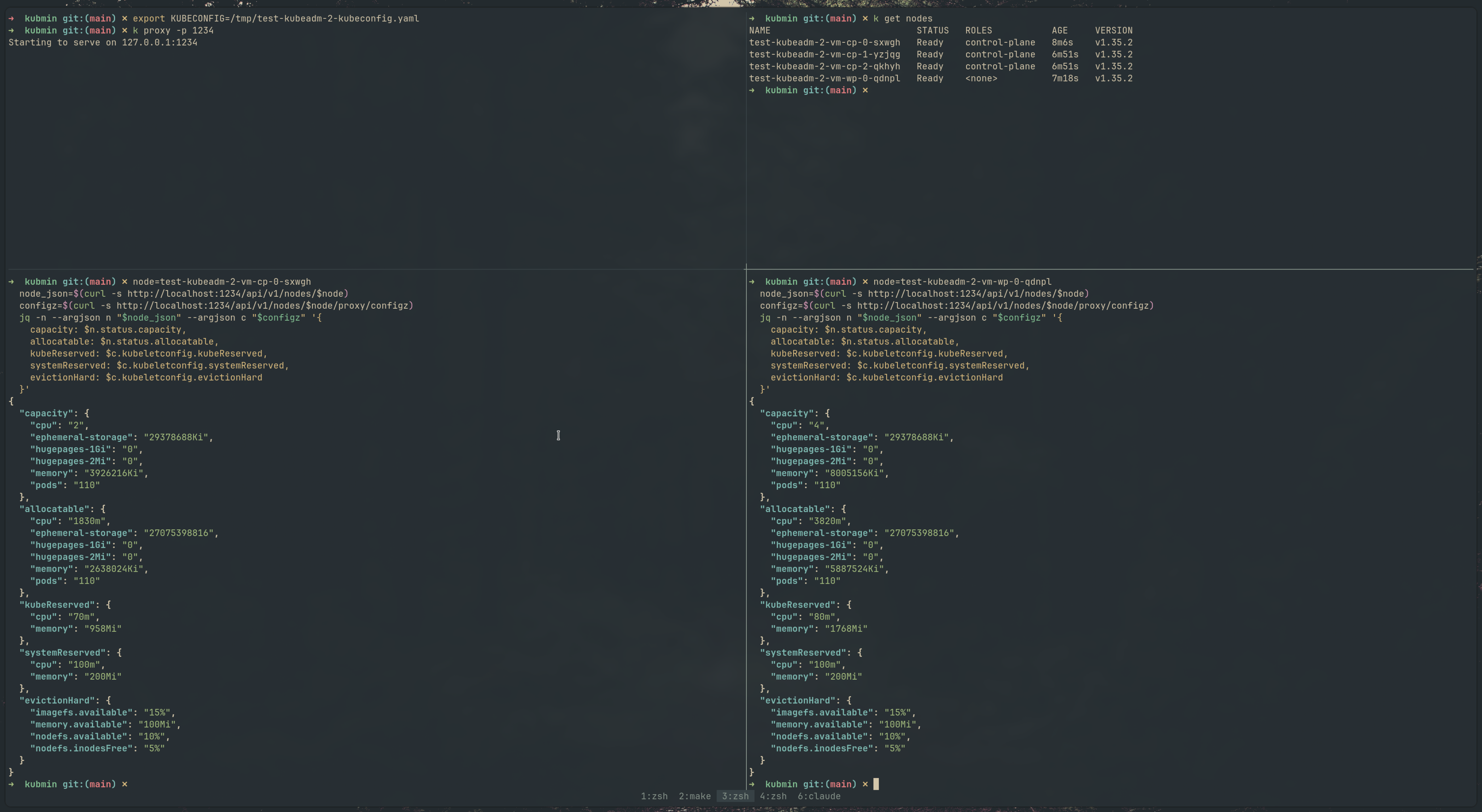
We tested this on self-managed clusters provisioned via ksctl — both kubeadm and K3s bootstrapped clusters on AWS. Here’s what it looks like in practice.
Kubeadm cluster
The /configz endpoint on both the control plane and worker nodes shows the drop-in values merged correctly — kubeReserved, systemReserved, and evictionHard all reflect the per-node computed values.
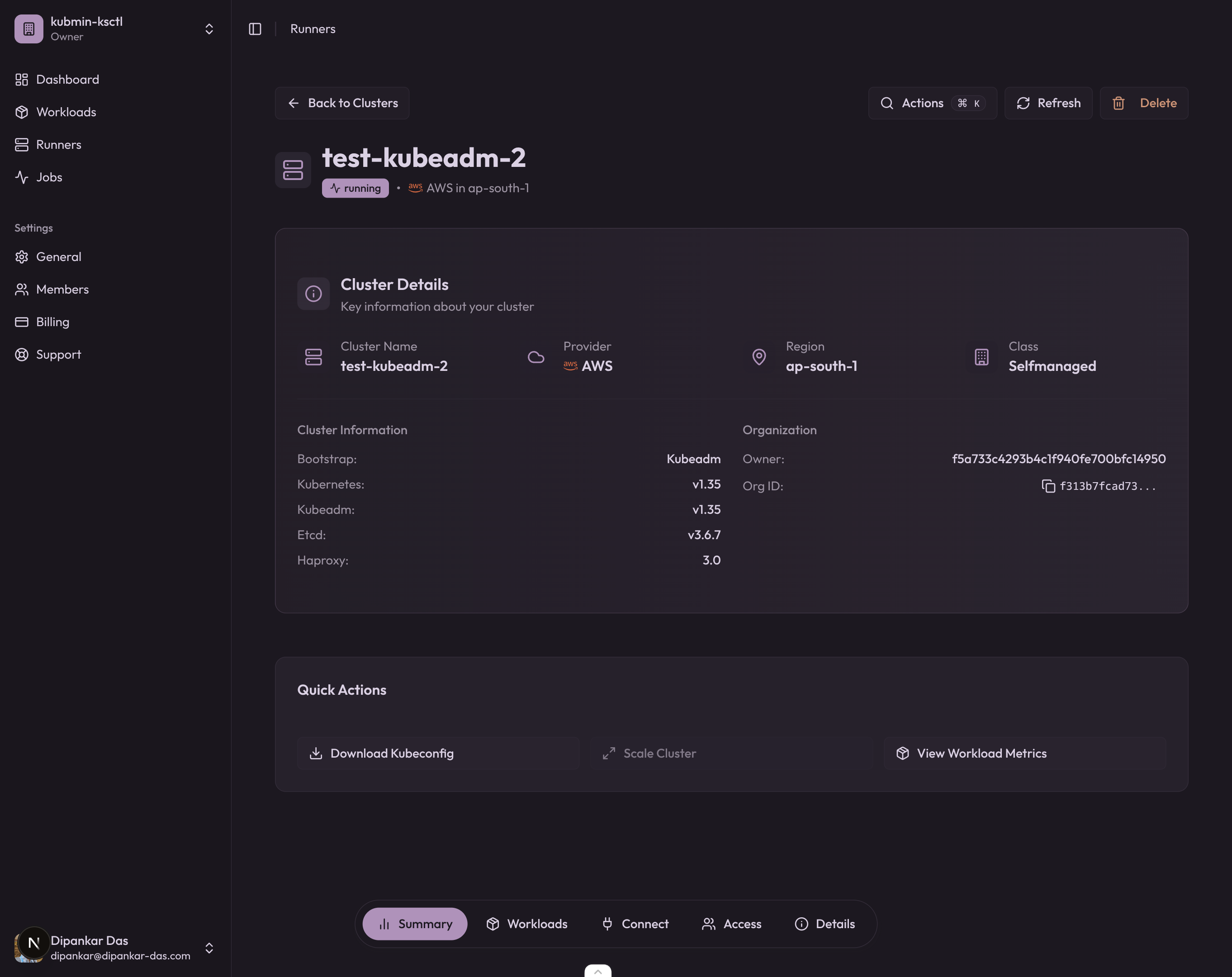
And the kubmin dashboard confirms the cluster is running with kubeadm v1.35 on AWS:
K3s cluster
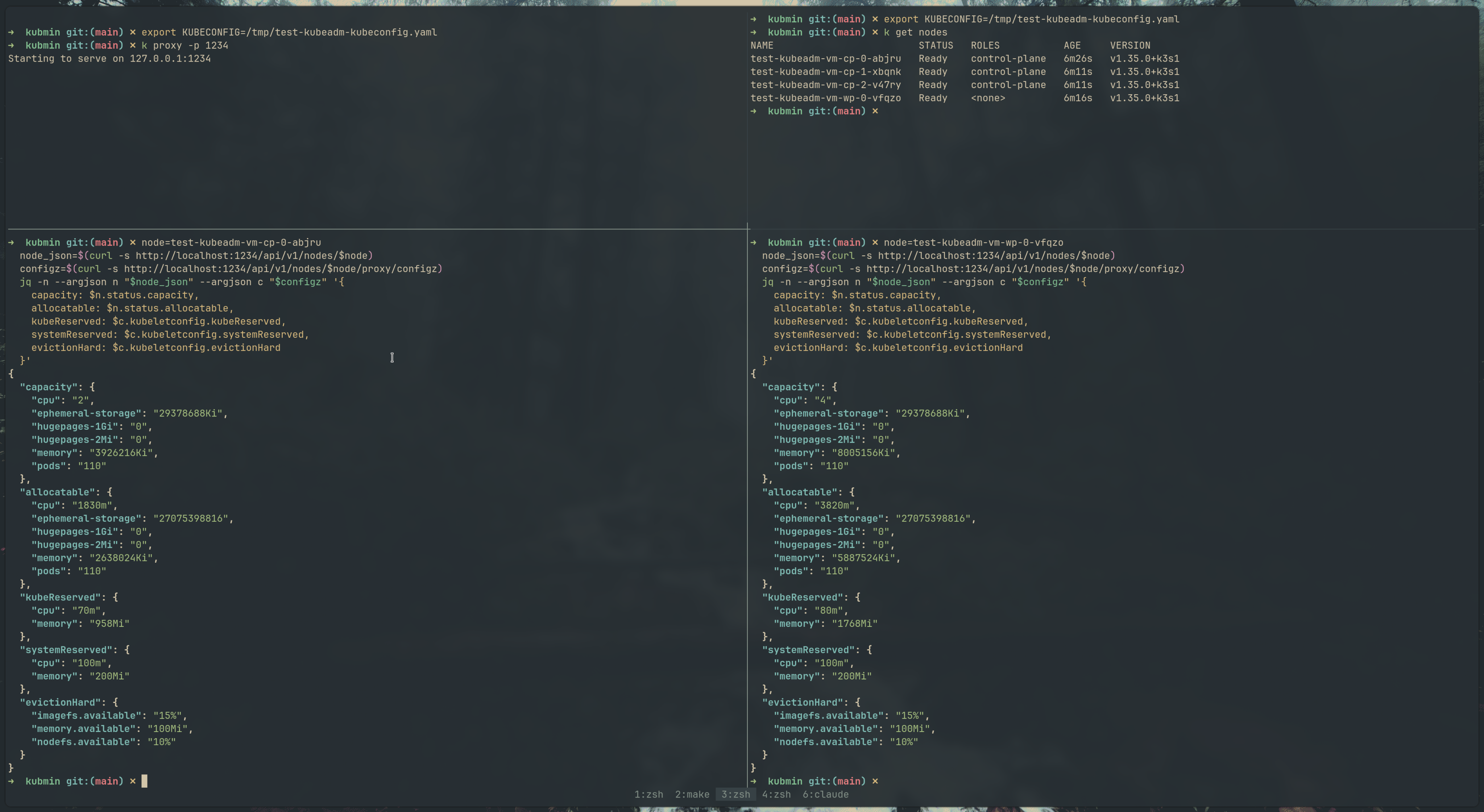
Same story with K3s — the --kubelet-arg flags are passed per-node, and the configz output confirms the reservations are applied independently on each node.
The kubmin dashboard for the K3s cluster:
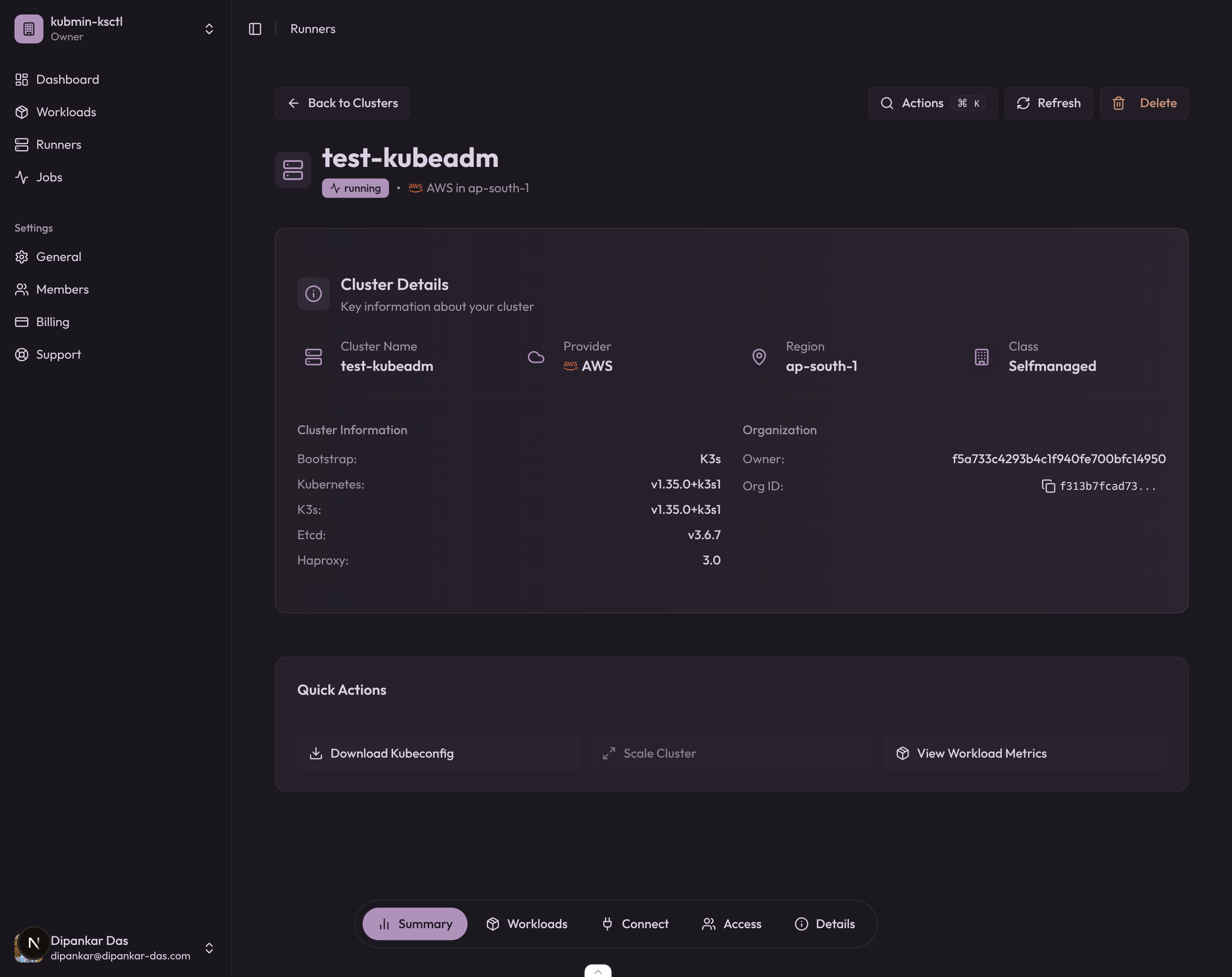
Yes, the K3s cluster is named test-kubeadm on the dashboard. I messed up the name while testing — don’t judge.
Inspect merged kubelet config via /configz
# Start a kubectl proxy
kubectl proxy &

# Fetch the merged kubelet config for a specific node
curl -s http://localhost:8001/api/v1/nodes/<node-name>/proxy/configz | jq .
Look for kubeReserved, systemReserved, and evictionHard in the output. These should reflect the drop-in values, not the base ConfigMap values.
Common pitfalls
-
Editor temp files in the drop-in directory — Files like
.99-reserved.conf.swpor99-reserved.conf~can cause the kubelet to fail parsing. Keep the drop-in directory clean; only*.conffiles should be present. -
Missing systemd daemon-reload — If you write the systemd drop-in but forget
systemctl daemon-reload, the kubelet won’t pick up--config-dir. The base config still works, but without drop-in merging. -
Wrong file permissions — The kubelet reads the drop-in files as root, so permissions are rarely an issue. But if you’re mounting them via a ConfigMap in a static pod, check that they’re readable.
-
Conflicting fields — If the base
KubeletConfigurationalready haskubeReservedset and the drop-in also sets it, the drop-in wins (last-writer-wins merging). This is by design, but can be confusing if you forget to clean the base config.
Conclusion
Understanding how Kubernetes carves up node resources is fundamental if you’re running self-managed clusters. The Allocatable formula (Capacity - kubeReserved - systemReserved - evictionThreshold) directly impacts scheduling decisions, cluster stability, and cost efficiency.
For homogeneous clusters, a single KubeletConfiguration works fine. But the moment you have mixed instance types — which is most real-world clusters — you need per-node reservations. The kubelet drop-in config directory (GA in v1.35) is the clean solution for kubeadm clusters: keep the base config generic, compute reservations locally on each node, and let the kubelet merge them at startup.
This is exactly the kind of thing I ran into while working on the instanceType fitting logic in ksctl — figuring out how much of a VM’s capacity is actually available for workloads. Turns out, the answer is “it depends on how well you’ve tuned your kubelet reservations.” We’re actively working on standardizing kubelet resource reservations and eviction configs across both K3s and kubeadm bootstrapping in ksctl — you can follow the progress in ksctl/ksctl#627.
References

Other posts
See all posts
Why Your Laptop GPU Will Never Work with Proxmox Passthrough
Six attempts, three days, one stubborn MX330. A post-mortem on laptop GPU passthrough in Proxmox — what failed, why it's architecturally impossible, and exactly what to buy instead.

Your Old Laptop Is a Linux Server: A Complete Proxmox Home Lab Setup Guide
Turn an old laptop into a full Proxmox home server — Wi-Fi NAT routing, DHCP, MTU fixes, and every gotcha you'll actually hit. A practical guide that also teaches you how AWS works.
Quantum Computing for the Curious Developer: Building Your First Circuits with Qiskit
A developer's hands-on guide to quantum computing fundamentals — from qubits and gates to building a quantum teleportation circuit, no physics degree required.