Local LLMs: I Went Deep So You Don't Have To
GGUF vs safetensors, quantization, distillation, VRAM math, and Ollama vs vLLM vs llama.cpp — one post to save you the weekend I lost.

I pulled Qwen 3.5 9B through Ollama, typed ollama run qwen3.5:9b, and it just worked. Decent responses, no config, no thinking. Then I opened HuggingFace to find a better model and hit a wall of acronyms — GGUF, safetensors, Q4_K_M, Q5_K_M, FP16, BF16, distilled, base, fine-tuned. Every model card reads like a spec sheet written for people who already know what they’re looking at.
I spent the last few weeks falling down this rabbit hole. Here’s what I learned — and what those acronyms actually mean for whether a model will run well on your machine.
It Started with “Opus 4.6 For Free” 😆
Ollama was fine, but I wanted more control. So I moved to LM Studio — same model, but now I could see quantization options, pick Q4_K_M vs Q5_K_M, adjust parameters, compare outputs side by side.
That’s when I found this on HuggingFace: Qwen3.5-9B-Claude-4.6-Opus-Reasoning-Distilled-v2-GGUF.
A 9B parameter model. Distilled from Claude 4.6 Opus reasoning traces. Available in GGUF format. “Almost like Opus 4.6 for free” was the claim. No API key. No per-token cost. No data leaving your machine.
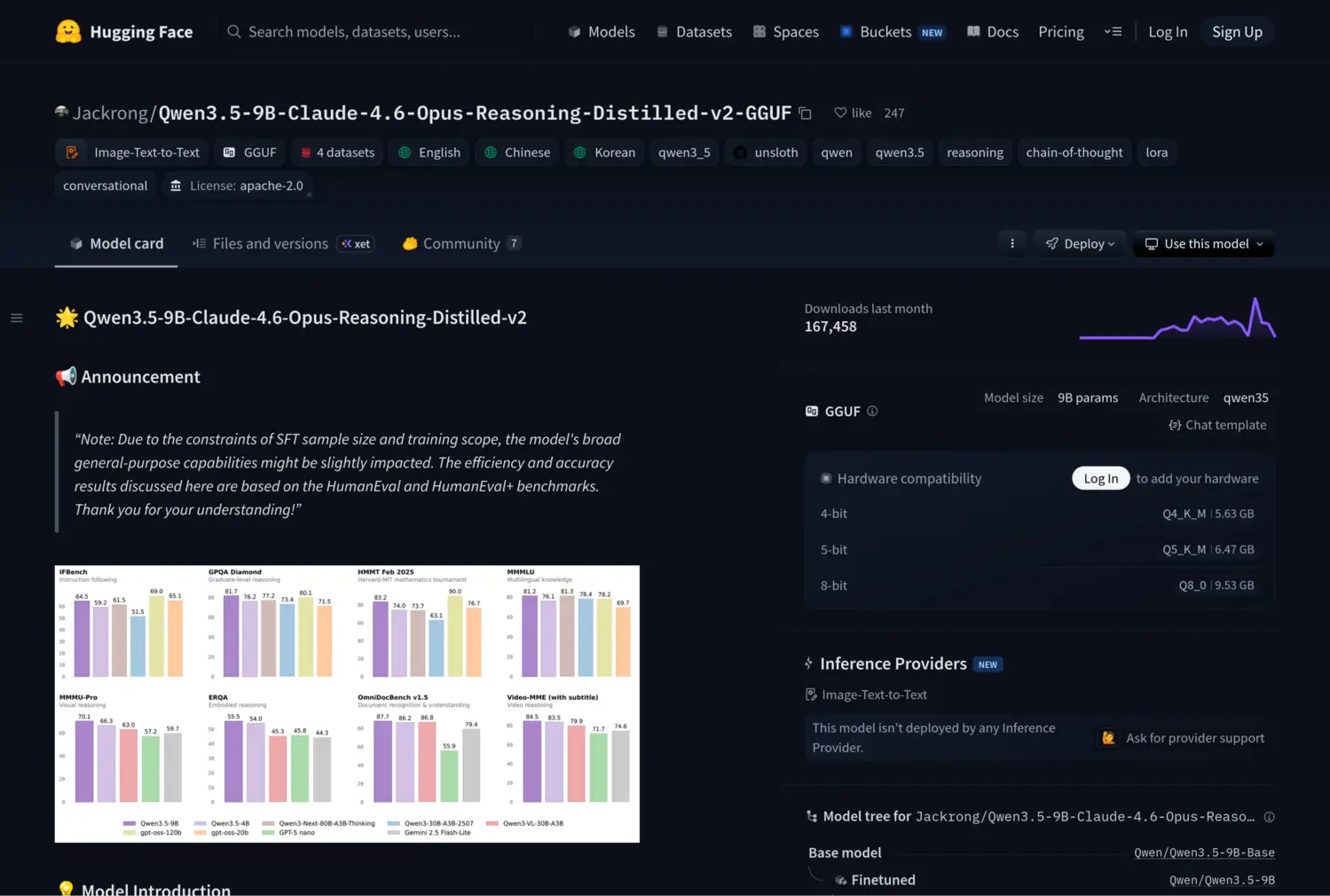
That sentence alone contains about four concepts I had to unpack. But the claim was too good to ignore.
It loaded in LM Studio, but I didn’t want to just chat with it. I wanted to serve it as an API, understand the inference machinery, and push my 8 GB GPU to its limits. That’s what pulled me into vLLM and eventually llama.cpp.
The Tooling Ladder: Ollama, LM Studio, vLLM, llama.cpp
Think of these four as different levels of abstraction — each one trades convenience for control.
Ollama is the Docker of local LLMs. It pulls pre-packaged models, handles quantization choices for you, and just works. If you want to run a model with minimal friction, start here. The tradeoff: you’re limited to the models and formats Ollama supports, and you get minimal control over inference parameters.
LM Studio gives you a GUI with more knobs. You can load GGUF files directly from HuggingFace, pick your quantization level, adjust context windows, and see real-time performance metrics. It’s where I first understood that model files aren’t just “big or small” — they come in different precisions. It also has a CLI (lms) that turns it into a headless server:
lms daemon up
lms import -c ./Qwen3.5-9B-Claude-4.6-Opus-Reasoning-Distilled-v2-Q5_K_M.gguf
lms load qwen3.5-9b-claude-4.6-opus-reasoning-distilled-v2@q5_k_m \
  --context-length 131072 --gpu 0.65 --identifier gg
lms server start  # starts the local API on port 1234
The CLI’s --gpu flag controls GPU offload ratio, --context-length sets the window, --ttl for auto-unload, and --estimate-only to preview resource usage. That’s about it for the CLI.
The GUI is a different story — it exposes a lot more: flash attention toggle, KV cache quantization (key and value separately), mmap/mlock settings, RoPE frequency tuning, eval batch size, and all the sampling parameters (temperature, top-p, top-k, repeat penalty). These are the knobs that matter for squeezing performance out of constrained hardware, and none of them are available via lms load.
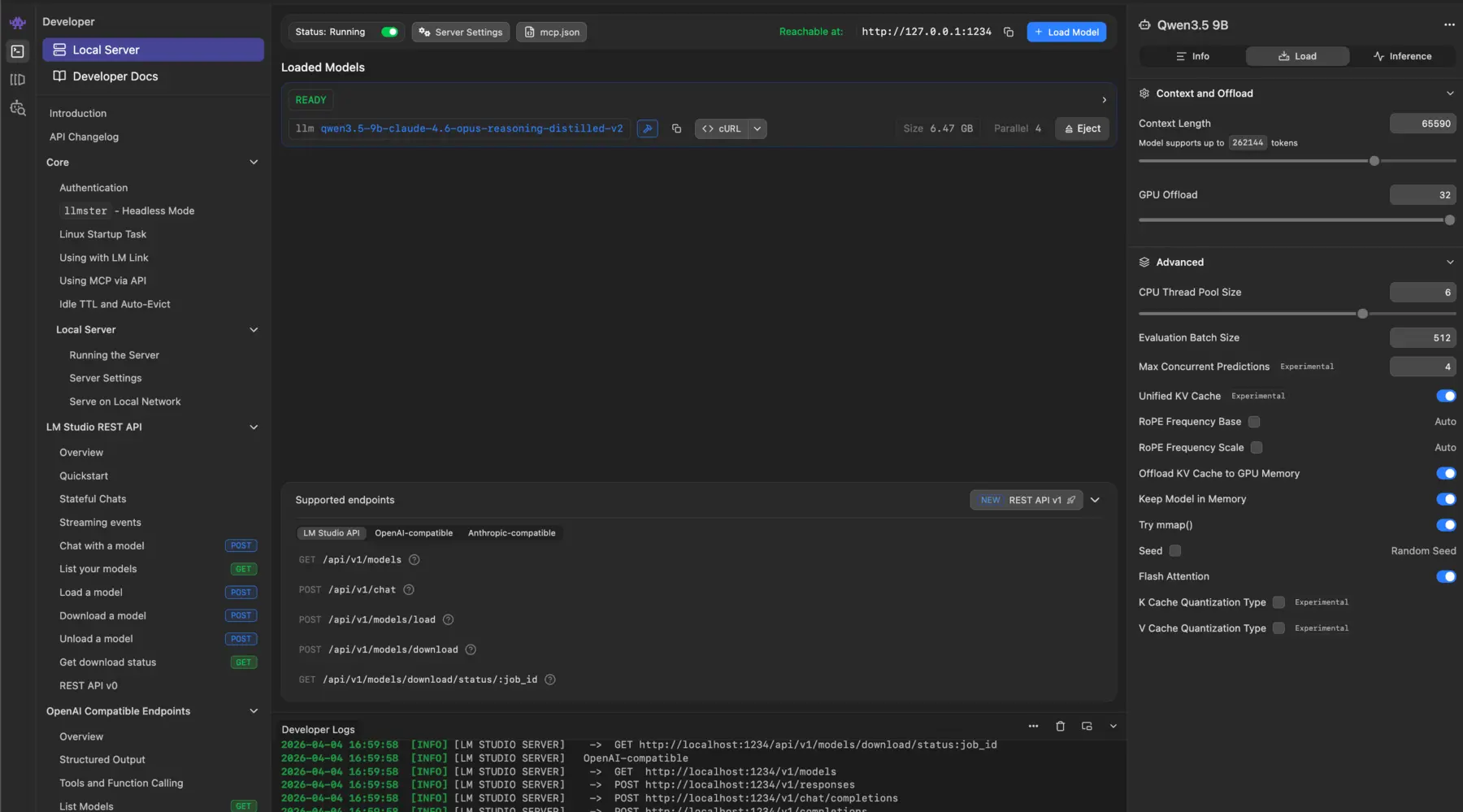
That gap is exactly why I eventually needed vLLM and llama.cpp — tools where every parameter is accessible from the command line. The --identifier gives the loaded model a short alias, so you can use LM Studio as a backend for any OpenAI-compatible client — including Claude Code:
ANTHROPIC_BASE_URL=http://localhost:1234 \
ANTHROPIC_AUTH_TOKEN=lmstudio \
claude --model gg
vLLM is a completely separate beast. Unlike Ollama and LM Studio, it is not built on llama.cpp. It’s an independent inference engine created by UC Berkeley researchers, built in Python/C++/CUDA around a custom memory architecture called PagedAttention. It’s designed for data-center-grade GPUs, high-throughput serving, and continuous batching. It recently added the ability to read GGUF files, but it executes them with its own engine, not llama.cpp. More on this below.
llama.cpp is the foundation that Ollama and LM Studio are built on. Created by Georgi Gerganov, it’s the C++ inference engine that made local LLMs practical on consumer hardware — and the reason GGUF exists as a format. It’s a raw engine — no GUI, no package manager, just a binary and flags. The lowest level of abstraction, but also the widest model support and the most control over memory, offloading, and quantization. When every other tool fails on a new architecture, llama.cpp usually works.
Why I Ended Up on vLLM
Ollama and LM Studio are great for tinkering, but vLLM is what real teams use to serve models behind APIs — PagedAttention, continuous batching, explicit memory management. I wanted that production exposure.
It didn’t go smoothly
My first experiment with a tiny 0.8B model worked:
vllm serve "Qwen/Qwen3.5-0.8B" \
  --port 8000 \
  --tensor-parallel-size 1 \
  --max-model-len 262144 \
  --reasoning-parser qwen3 \
  --enable-auto-tool-choice \
  --tool-call-parser qwen3_coder
Every parameter is explicit, and when something fails, the error messages tell you exactly which resource limit you hit. But the 0.8B model consumed nearly all 8 GB of VRAM in full precision. I wanted the 9B Claude-distilled model — as a GGUF.
Attempt 1: Qwen 3.5 9B GGUF from Unsloth
vllm serve unsloth/Qwen3.5-9B-GGUF:Q4_K_M \
  --tokenizer Qwen/Qwen3.5-9B \
  --hf-config-path Qwen/Qwen3.5-9B
It downloaded the entire 5.68 GB model file — 19 minutes on my connection — resolved the architecture as Qwen3_5ForConditionalGeneration, and then:
RuntimeError: Unknown gguf model_type: qwen3_5Nineteen minutes of downloading. For an error on the last line.
Attempt 2: The Claude-distilled GGUF loaded locally
Maybe the remote repo was the issue? I already had the GGUF file on disk. So I pointed vLLM directly at it:
vllm serve ./Qwen3.5-9B-Claude-4.6-Opus-Reasoning-Distilled-v2-Q5_K_M.gguf \
  --port 8000 \
  --tokenizer=Qwen/Qwen3.5-9B \
  --hf-config-path=Qwen/Qwen3.5-9B \
  --max-model-len 16384 \
  --tensor-parallel-size 1 \
  --gpu-memory-utilization 0.9
Different error, same root cause:
ValueError: GGUF model with architecture qwen35 is not supported yet.This time it failed even earlier — in HuggingFace’s transformers library, before vLLM’s own loader even got a chance.
Attempt 3: The 35B MoE model
I also tried the Qwen 3.5 35B-A3B — a Mixture of Experts architecture where only 3B parameters are active per token despite having 35B total. Same story:
vllm serve "Qwen/Qwen3.5-35B-A3B-GGUF:Q4_K_M" \
  --port 8000 \
  --tokenizer=Qwen/Qwen3.5-35B-A3B \
  --hf-config-path=Qwen/Qwen3.5-35B-A3B \
  --served-model-name=Qwen/Qwen3.5-35B-A3B \
  --tensor-parallel-size 1 \
  --max-model-len 65536 \
  --gpu-memory-utilization 0.9
RuntimeError: Unknown gguf model_type: qwen3_5_moe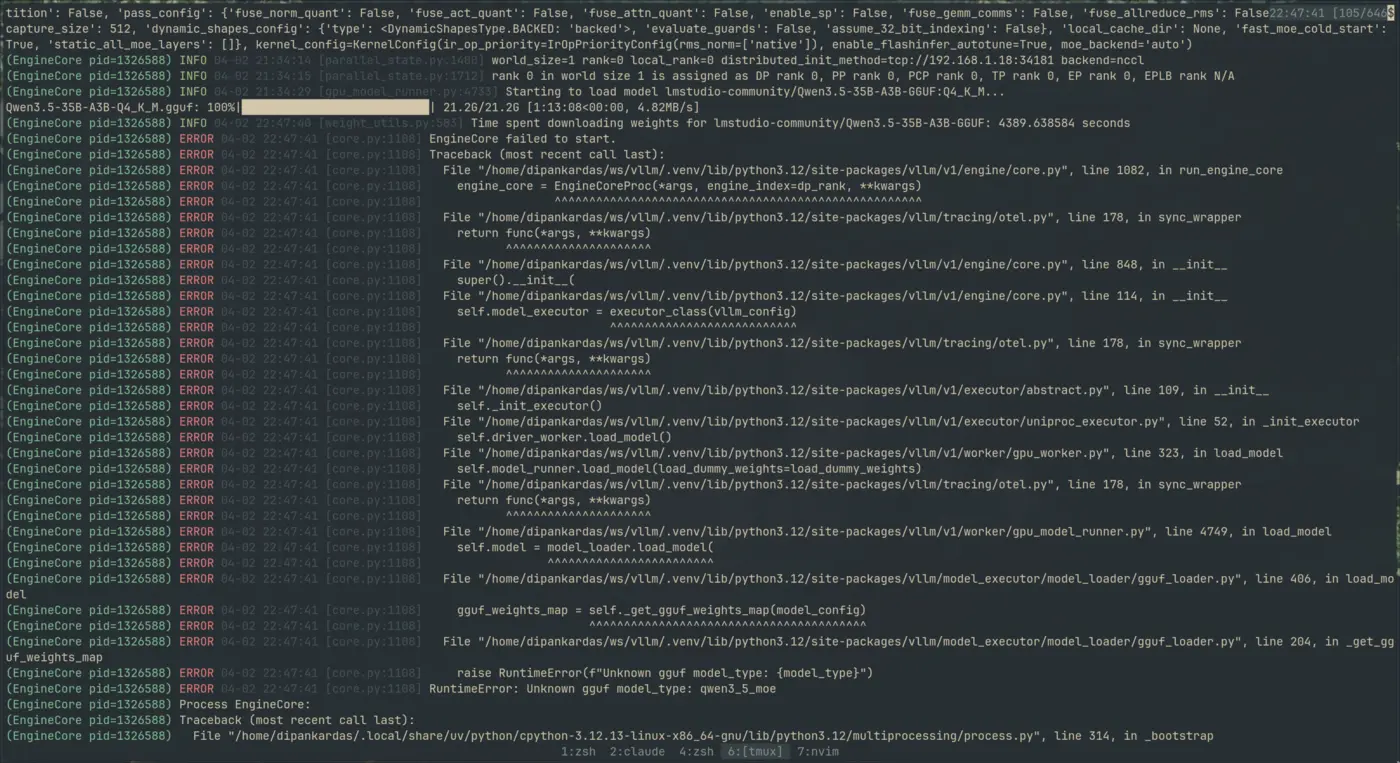
What’s actually going on here?
To be clear: vLLM does support GGUF — experimentally, since around v0.5. The syntax uses a repo:quant_type format, you need to specify --tokenizer separately (GGUF tokenizers can cause issues), and it only works with single-file GGUFs. For many model architectures, it works fine.
But Qwen 3.5 specifically? Broken. There are open issues on GitHub (#36456, #38122) — the qwen35 architecture isn’t supported yet in vLLM’s GGUF loader. The fix requires changes in the HuggingFace transformers GGUF parser, not just vLLM itself.
And that wasn’t even the only vLLM roadblock. Before the architecture errors, I’d hit a CUDA version mismatch. vLLM needs CUDA to use your NVIDIA GPU — and installing the default pip package gave me:
ImportError: libcudart.so.12: cannot open shared object fileThe default pip install vllm pulls a wheel built against CUDA 12.x. My Fedora 43 system ships with CUDA 13.0. It couldn’t find libcudart.so.12 because it doesn’t exist — I have libcudart.so.13.
The fix: vLLM v0.19+ now ships pre-built wheels for specific CUDA versions, including cu130:
uv venv .venv -p 3.12
source .venv/bin/activate

export VLLM_VERSION=$(curl -s https://api.github.com/repos/vllm-project/vllm/releases/latest \
  | jq -r .tag_name | sed 's/^v//')
export CUDA_VERSION=130
export CPU_ARCH=$(uname -m)

uv pip install \
  "https://github.com/vllm-project/vllm/releases/download/v${VLLM_VERSION}/vllm-${VLLM_VERSION}+cu${CUDA_VERSION}-cp38-abi3-manylinux_2_35_${CPU_ARCH}.whl" \
--extra-index-url "https://download.pytorch.org/whl/cu${CUDA_VERSION}"If you’re on a bleeding-edge distro (Fedora 43+, Arch, etc.) with GCC 14/15 and CUDA 13.x — things get messy fast. The CUDA/GCC compatibility matrix is tight, and many Python packages don’t ship wheels for cu130 yet. If you can, stick with CUDA 12.x and GCC 13 — that’s the path of least resistance. The pre-built wheels from vLLM’s releases page will save you hours of compiling from source.
The vLLM + GGUF reality check:
- vLLM + GGUF = yes, experimentally supported
- vLLM + Qwen 3.5 GGUF = no, broken right now (open bugs)
- For Qwen 3.5 GGUF, stick with llama.cpp — it’s the only engine that handles this architecture reliably today
Check the vLLM GGUF docs for the current list of supported architectures.
Models ship faster than inference engines can support them, and the CUDA ecosystem adds another layer of version pinning on top.
What vLLM taught me anyway
Even though Qwen 3.5 didn’t load, the debugging taught me how vLLM actually works — and it’s worth understanding if you ever use a model it does support.
PagedAttention — Most inference engines pre-allocate a contiguous block of GPU memory for the KV cache. Set a 16K context window, it reserves memory for 16K tokens per request, even if most requests only use 2K. vLLM manages KV cache like virtual memory pages — allocating and freeing blocks dynamically. This alone gives 2-4x better throughput with multiple requests.
Continuous batching — Ollama and LM Studio process one request at a time. vLLM swaps finished sequences out and new ones in without waiting. The moment you connect a local model to an agent loop or a coding assistant, you’re sending multiple requests and this matters.
The OpenAI-compatible API — vLLM exposes your local model as an endpoint that speaks the same protocol as OpenAI’s API. Any tool that works with gpt-4 can point at localhost:8000 instead — your local model becomes a drop-in replacement.
The memory model — vLLM splits GPU memory into static (model weights) and dynamic (KV cache). Each has different flags to move it between GPU, CPU RAM, and swap:
| Component | Flag | Where it moves | Performance hit |
|---|---|---|---|
| Model Weights | --cpu-offload-gb | GPU → CPU RAM | High (every token) |
| KV Cache (overflow) | --kv-offloading-size | GPU → CPU RAM | Medium (context swaps) |
| KV Cache (emergency) | --swap-space | GPU → CPU RAM | Low (preemption only) |
| Total GPU limit | --gpu-memory-utilization | Controls VRAM cap | N/A |
Other useful flags: --enforce-eager (disables CUDA graphs to free VRAM), --kv-cache-dtype fp8 (cuts KV cache memory ~50%), --max-num-seqs (limits concurrent requests).
Check your PCIe speed before offloading. CPU offloading streams weights over PCIe every forward pass. On Gen 4+ it’s workable; on Gen 3 or lower, it tanks performance:
sudo lspci -vv -s $(lspci | grep -i vga | awk '{print $1}') | grep -E "LnkSta:"
# Example: LnkSta: Speed 16GT/s, Width x8 → PCIe Gen 4| Speed | PCIe Gen | Approx Bandwidth (x16) |
|---|---|---|
| 32.0 GT/s | Gen 5 | ~63 GB/s |
| 16.0 GT/s | Gen 4 | ~32 GB/s |
| 8.0 GT/s | Gen 3 | ~16 GB/s |
| 5.0 GT/s | Gen 2 | ~8 GB/s |
| 2.5 GT/s | Gen 1 | ~4 GB/s |
Why 262K context failed on vLLM with 8 GB VRAM: Even with offloading, vLLM needs VRAM for the active portion of that context — pointers, initial activations, PagedAttention working memory. On an 8 GB card with a 9B model taking ~5.5 GB, there’s no headroom. Start with --max-model-len 32768, check nvidia-smi, and increment from there.
For the full reference, see the vLLM Engine Arguments and Conserving Memory guides.
The llama.cpp alternative
At this point I was tired but stubborn. Three vLLM failures, a CUDA mismatch, and an hour of debugging. I just wanted to see the model run.
vLLM wasn’t going to work for Qwen 3.5 GGUF — so I went with the alternative: llama.cpp. It’s a completely different engine from vLLM, and it’s the one that Ollama and LM Studio are built on top of. It invented the GGUF format. If any tool was going to load this model, it would be llama.cpp.
My first attempt was the Nix package:
nix profile install nixpkgs#llama-cpp

llama-server \
  -m ./Qwen3.5-9B.Q5_K_M.gguf \
  --port 8000 \
  -c 8192 -ngl full \
  --host 0.0.0.0
It worked — the model loaded, the server started, I got responses. One problem: it was running entirely on CPU. The -ngl full flag tells llama.cpp to offload all layers to GPU, but the Nix package wasn’t compiled with CUDA support. It fell back silently. No error, no warning. Just slow inference.
Compiling llama.cpp from source (the Fedora 43 adventure)
CPU inference on a 9B model is painful. I needed GPU offloading. That meant compiling llama.cpp from source with CUDA enabled.
git clone https://github.com/ggml-org/llama.cpp
cd llama.cpp

rm -rf build/  # clean slate — important if you're retrying after a failed build
cmake -B build -DGGML_CUDA=ON
cmake --build build --config Release -j20  # -j20 = parallel compile, adjust to your core count (nproc)
Simple, right? Not on Fedora 43.
Fedora 43 ships with GCC 15 and G++ 15. The official NVIDIA repo provides CUDA 13.x. And CUDA 13.x’s header files weren’t fully compatible with GCC 15’s stricter C++ standards. The build failed with errors deep inside CUDA’s own math headers.
This is actually a documented issue in the llama.cpp build guide — when your CUDA toolkit’s glibc expectations don’t match your system’s GCC version, math function declarations have mismatched exception specifications.
Save yourself the headache: If you’re not on a bleeding-edge distro, use CUDA 12.x with GCC 13 or 14. That combination compiles llama.cpp (and vLLM) without any header patching. The issue I hit is specific to CUDA 13.x + GCC 15 — a combo you’ll only encounter on Fedora 43+, Arch, or similar rolling-release distros.
If you are stuck with CUDA 13.x and GCC 15, the fix is surgical. In this header:
/usr/local/cuda-13.1/targets/x86_64-linux/include/crt/math_functions.hfunctions like rsqrtf and rsqrt needed noexcept(true) annotations to satisfy GCC 15:
// Before (CUDA 13.x shipped this):
extern __DEVICE_FUNCTIONS_DECL__ __device_builtin__ float rsqrtf(float x);
extern __DEVICE_FUNCTIONS_DECL__ __device_builtin__ double rsqrt(double x);

// After (what GCC 15 requires):
extern __DEVICE_FUNCTIONS_DECL__ __device_builtin__ float rsqrtf(float x) noexcept(true);
extern __DEVICE_FUNCTIONS_DECL__ __device_builtin__ double rsqrt(double x) noexcept(true);
After patching the CUDA headers and rebuilding, it compiled cleanly. And then:
./build/bin/llama-server \
  -m ./Qwen3.5-9B.Q5_K_M.gguf \
  --port 8000 \
  -c 45000 -ngl full \
  --host 0.0.0.0
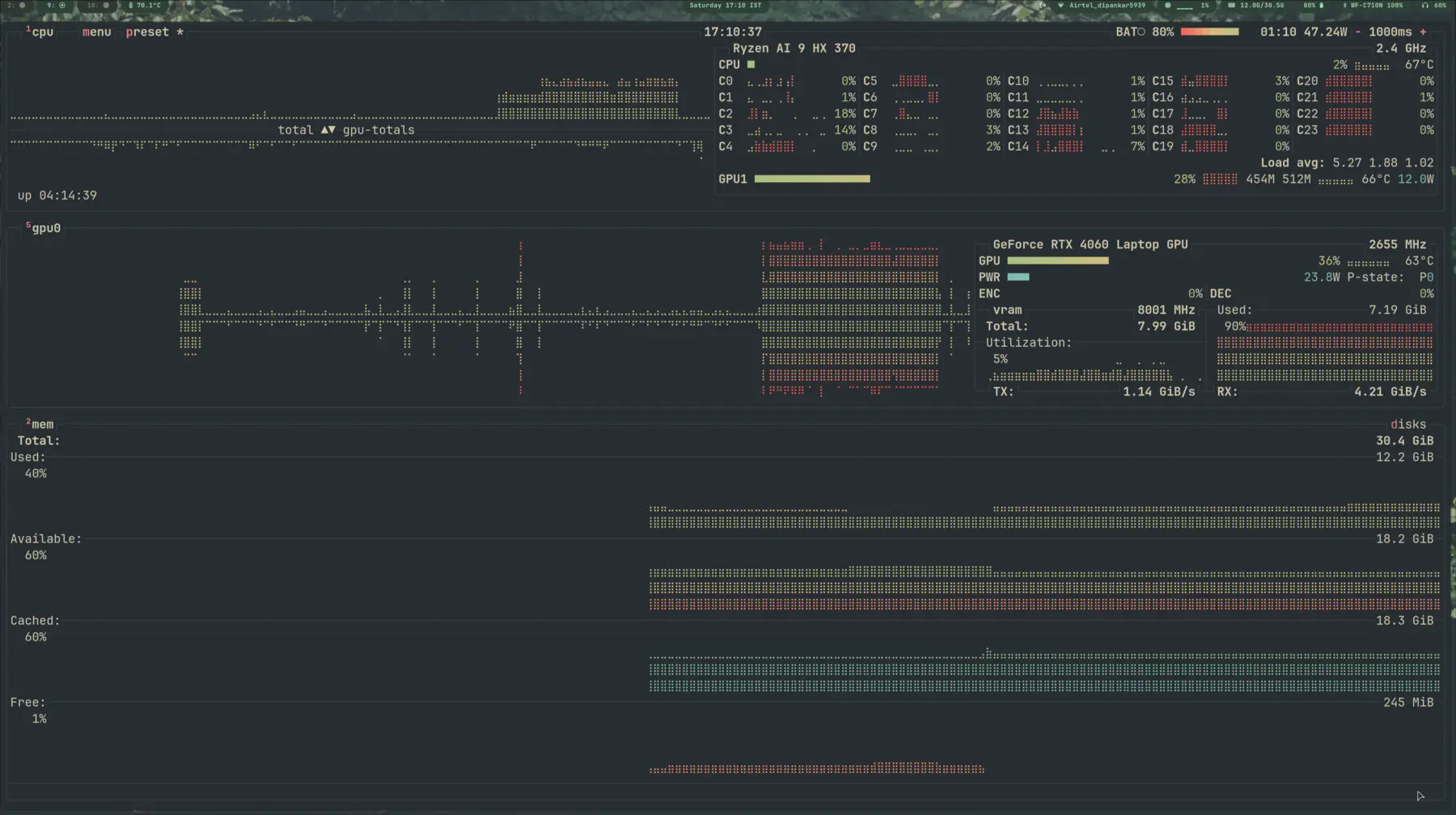
It worked. On GPU. But I could only push the context window to about 45,000 tokens before running out of VRAM. I wanted the model’s full 262,144 token context. That meant learning what actually consumes GPU memory — and where to make tradeoffs.
Squeezing out the full 262K context
Running llama-server with --verbose gave me the real VRAM breakdown on my RTX 4060 Laptop (8 GB):
| Component | VRAM |
|---|---|
| Model weights | 5,491 MiB |
| Context (KV + recurrent state) | 1,457 MiB |
| Compute buffers | 493 MiB |
| Total | 7,441 MiB |
| Free VRAM available | 7,360 MiB |
At 40K context, I was already 81 MiB over budget. The auto-fit system had to silently offload layers to CPU. Going to 262K on GPU alone? Not happening. (I’ll break down the full VRAM math — and the formula for estimating whether a model will fit your GPU — later in this post.)
The solution was a combination of three tricks:
1. KV cache quantization — Instead of storing the attention cache in full precision, quantize it:
--cache-type-k q4_0reduces key cache memory by ~75%--cache-type-v q4_0reduces value cache memory by ~75%
2. KV cache offloading — --no-kv-offload moves the entire KV cache to system RAM. The GPU holds only model weights and compute buffers. This is the “GPU ratio” trick — you’re trading PCIe bandwidth for VRAM space.
3. Flash attention — --flash-attn on avoids materializing the full attention matrix, saving temporary VRAM during computation.
The final command for text-only inference with the full 262K context window:
/home/dipankardas/llama.cpp/build/bin/llama-server \
  -m /home/dipankardas/ws/vllm/Qwen3.5-9B-Q5_K_M.gguf \
  --port 8000 \
  -c 262144 \ # <~~ Honestly overkill and I soon realized 256k or even 128k not practical, but I wanted to test the limits
  --host 0.0.0.0 \
  --no-kv-offload \
  -ngl auto \
  -b 512 -ub 128 \
  --cache-type-k q4_0 \
  --cache-type-v q4_0 \
  --flash-attn on \
--jinjaText-only mode: -ngl auto automatically tunes GPU layers to fit your VRAM.
Vision models: --fit is more conservative — use it when you have multi-modal workloads.
Context window limits: On 8 GB VRAM, 64K (65536) is the practical maximum. I tested 262K and the Cuda OOM killer hit reliably after ~80K context. The GPU needs VRAM for calculation, not just storage.
Pro tip: For batch sizes, -b 512 and -ub 128 prevent prefill spikes. For automatic tuning, --fit handles multi-modal workloads more safely.
The tradeoff: prefill is slower. Prefill is the phase where the model processes all your input tokens before generating the first output token. With --no-kv-offload, the KV cache writes go to system RAM over PCIe instead of staying on GPU. For short prompts (under 1K tokens), you barely notice. For massive prompts (50K+ tokens), you’ll wait noticeably longer before the first token appears. But once generation starts, speed is fine — each new token only reads a small slice of the cache.
Why 262K and not more? Because that’s the model’s trained context length. The RoPE positional encodings were trained up to 262,144 tokens. Push beyond that and the model extrapolates into positions it’s never seen — quality degrades, coherence breaks down, and you get garbage. The context window isn’t just a memory limit; it’s a capability boundary.
Using it as a drop-in API
Once llama-server is running, it exposes an OpenAI-compatible API. Any tool that speaks the OpenAI protocol can point at localhost:8000 and use your local model. I configured it as a provider in my coding tools:
{
  "llamacpp-local": {
    "name": "llama.cpp server (Local)",
    "npm": "@ai-sdk/openai-compatible",
    "options": {
      "baseURL": "http://0.0.0.0:8000/v1"
    },
    "models": {
      "qwen3.5-9b-opus-4.6:Q5_K_M": {
        "limit": {
          "context": 262144,
          "output": 262144
        }
      }
    }
  }
}
A Claude-distilled, quantized, locally-hosted model — running on an 8 GB laptop GPU with 262K context — acting as a coding assistant through a standard API. That’s the payoff of understanding all those acronyms.
Enabling vision (multimodal)
Qwen 3.5 is a multimodal model — it can process images, not just text. But vision doesn’t come free. You need the mmproj (multimodal projection) file from the HuggingFace repo, and you need to sacrifice some GPU layers to make room for it.
./build/bin/llama-server \
  -m ./Qwen3.5-9B-Q5_K_M.gguf \
  --mmproj ./mmproj-BF16.gguf \
  --port 8000 \
  -c 131072 --host 0.0.0.0 \
  --no-kv-offload -ngl auto \
  --cache-type-k q4_0 --cache-type-v q4_0 \
  --flash-attn on \
  --jinja
Notice the change: -ngl went from auto (all layers on GPU) down to auto or in my case 30 even there is --fit on. The vision projection layers and their scratch space need VRAM too — on my 8 GB card, there simply wasn’t room for the full model and vision. Dropping a few layers to CPU freed enough headroom for the multimodal pipeline. If you have more VRAM to spare, crank -ngl back up.
The API config also needs to declare the model’s multimodal capabilities:
{
  "$schema": "https://opencode.ai/config.json",
  "provider": {
    "llamacpp-local": {
      "name": "llama.cpp server (Local)",
      "npm": "@ai-sdk/openai-compatible",
      "options": {
        "baseURL": "http://0.0.0.0:8000/v1"
      },
      "models": {
        "qwen3.5-9b-opus-4.6-text:q5_k_m": {
          "_launch": true,
          "name": "qwen3.5-9b-opus-4.6-T:Q5_K_M",
          "modalities": {
            "input": ["text"],
            "output": ["text"]
          },
          "limit": {
            "context": 131072,
            "output": 131072
          }
        },
        "qwen3.5-9b-opus-4.6-vl:Q5_K_M": {
          "_launch": true,
          "name": "qwen3.5-9b-opus-4.6-VL:Q5_K_M",
          "modalities": {
            "input": ["image", "text"],
            "output": ["text"]
          },
          "limit": {
            "context": 65536,
            "output": 65536
          }
        }
      }
    }
  }
}
Now the local model can read images. A 9B model on an 8 GB laptop GPU doing vision and text — not bad for “free Opus.”
The Multimodal Memory Trap
I learned the hard way that Multimodal is not just “Text + Image.” It’s “Text + Image + Massive VRAM Overhead.”
When I switched to a multimodal model, my OOM crashes became frequent. I realized that my batch size settings (-b and -ub) were too aggressive. Here’s the reality:
The Vision Encoder Tax: Multimodal models include a Vision Encoder (like CLIP or SigLIP). This component is loaded into VRAM permanently. That’s ~1-2 GB of VRAM gone before I even type a prompt.
The Prefill Spike: When I send an image, the model converts it into “visual tokens.” Processing these happens during the “prefill” phase (governed by -b). If -b is too high, the GPU tries to process the entire image and text prompt in one massive calculation. On an 8 GB card, this causes an immediate memory spike that hits the ceiling.
The Solution: I had to downsize my batch settings to survive the “Prefill Spike.”
The “Stable” Multimodal Settings for 8 GB VRAM:
-b 128: I lowered this significantly. It makes the “prefill” (ingesting the image) slower, but it prevents the memory spike that triggers the OOM killer.-ub 64: I halved my generation buffer. It’s safer for the “steady state” of generation.
The Golden Rule: If you are running multimodal on limited VRAM, Batch Size is your enemy. Lowering it doesn’t just save memory; it prevents the spikes that crash the system.
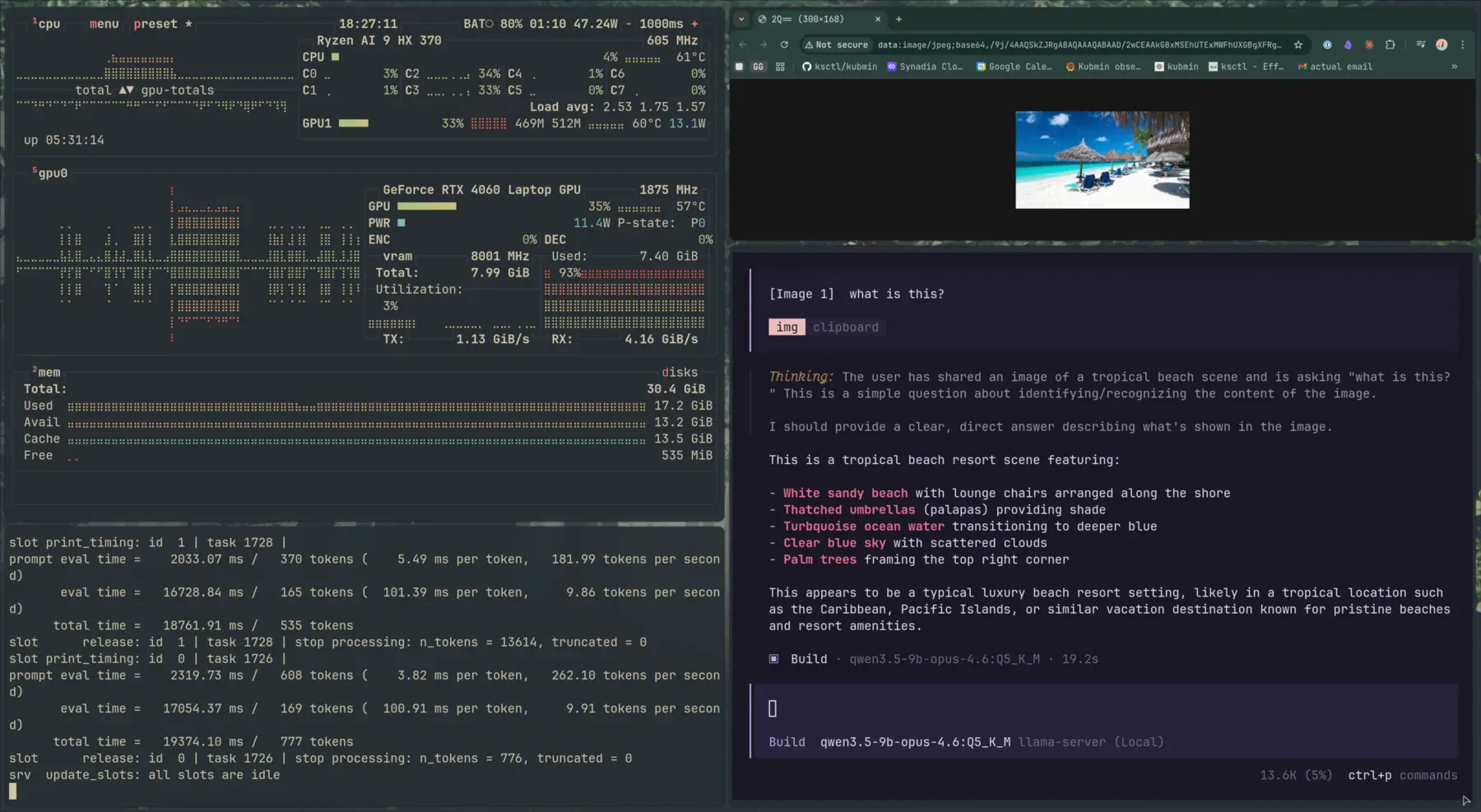
After Ollama’s format limits, LM Studio’s compatibility gaps, vLLM’s architecture errors, and a Nix package that silently ignored my GPU — compiling from source and patching CUDA headers is what finally got me here.
Nobody puts that in the “Getting Started” guide.
When to use what: Ollama if you want to chat with a model in 30 seconds. LM Studio if you want to explore models with a GUI and compare outputs. vLLM if you want to serve a model as an API and understand inference machinery. And llama.cpp when everything else fails — it’s the lowest common denominator that supports the widest range of GGUF models.
The real tooling lesson: Don’t marry one inference engine. Models, formats, and architectures evolve faster than any single tool can keep up. The ability to drop down a layer — from Ollama to LM Studio to vLLM to llama.cpp — is what keeps you unblocked.
Finally Here is my current configuration command for text based inferenceing
./build/bin/llama-server -m ./Qwen3.5-9B-Q5_K_M.gguf --port 8000 -c 131072 --host 0.0.0.0  -ngl auto -b 512 -ub 128 --cache-type-k q4_0 --cache-type-v q4_0 --flash-attn on --jinja
# not sure how much opencode works great.
And for multimodal inference:
./build/bin/llama-server -m ./Qwen3.5-9B-Q5_K_M.gguf --mmproj ./mmproj-BF16.gguf --port 8000 -c 65536 --host 0.0.0.0 --no-kv-offload -ngl auto -b 128 -ub 64 --cache-type-k q4_0 --cache-type-v q4_0 --flash-attn on --jinjaTwo Ways to Store a Brain: Safetensors vs GGUF
By now you’ve seen me juggle GGUF files, complain about safetensors model sizes, and throw around terms like Q4_K_M. Here’s what all of that actually means — the concepts I had to piece together from model cards and error messages.
Safetensors
Think of safetensors as just a box for tensors. It doesn’t care what’s inside — FP16 weights, BF16 weights, or 4-bit quantized weights all go in the same kind of box. The box itself doesn’t pick a precision; whoever saved the model did.
In practice, most HuggingFace repos put FP16 or BF16 weights in that box. That’s why people think of safetensors as “the full-precision format” — but that’s just convention. A 9B model at FP16 lands around 18 GB (9B params × 2 bytes). You’ll also find boxes with INT4 weights from AWQ/GPTQ or bitsandbytes, or FP8 from TensorRT — same safetensors file format, different precision inside.
Why use this box at all? Two reasons:
- Safety. The older PyTorch
.bin/pickle format could run arbitrary code when you loaded it. Safetensors can’t — it’s pure data. - Speed. It’s memory-mapped, so loading is basically instant. The GPU can pull weights straight from the file as it needs them.
So when you see safetensors on HuggingFace, it’s the GPU-native ecosystem’s format: what PyTorch, transformers, vLLM, and the AWQ/GPTQ/bitsandbytes quantization tools all speak fluently.
GGUF
GGUF is the format that made local LLMs practical on consumer hardware. Developed in the llama.cpp ecosystem, it bundles everything into a single file: the model weights, architecture configuration, tokenizer, and quantization metadata.
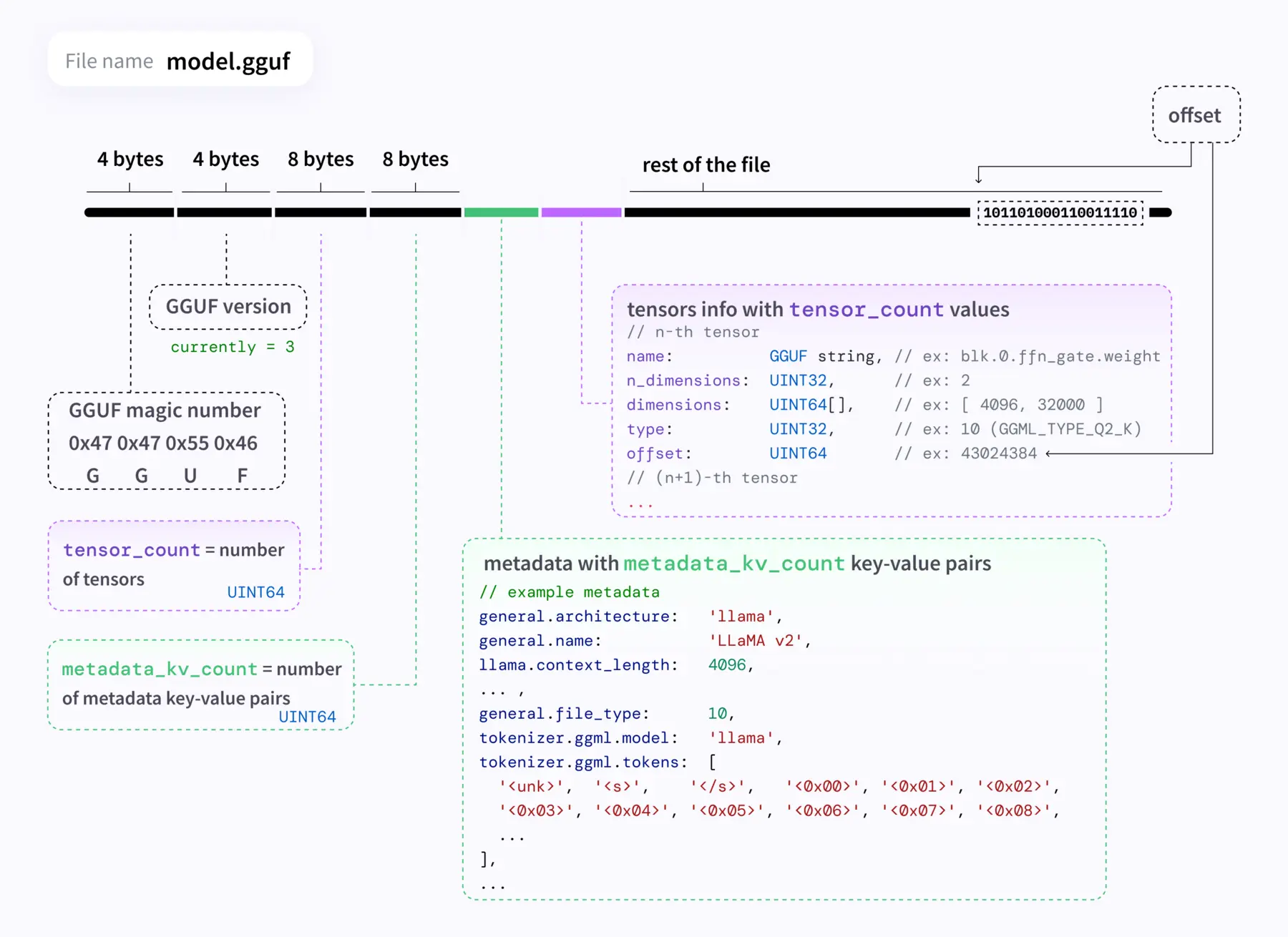
The key difference: GGUF is designed to hold quantized weights. Instead of storing each parameter as a 16-bit float, it can compress them to 8-bit, 5-bit, even 4-bit representations. That same 9B model that takes 18 GB in safetensors? In GGUF with Q4_K_M quantization, it’s 5.63 GB.
That’s not a typo. Same model. Same 9 billion parameters. A third of the size.
The catch is that you’re trading precision for space. And understanding that tradeoff is the entire game.
Quantization: The Precision-Size Spectrum
Quantization is the process of reducing the numerical precision of model weights. The full-precision model uses 16-bit floating point numbers for each weight. Quantization maps those numbers to lower-bit representations.
Here’s what the naming convention means:
| Format | Bits | Bytes/Weight | 9B Model Size | Quality Impact |
|---|---|---|---|---|
| FP16 | 16 | 2.0 | ~18 GB | Baseline |
| Q8_0 | 8 | ~1.06 | ~9.53 GB | Near-lossless |
| Q5_K_M | 5 | ~0.72 | ~6.47 GB | Slight degradation |
| Q4_K_M | 4 | ~0.63 | ~5.63 GB | Good balance |
The naming breaks down like this: Q = quantized, the number = bits per weight, K = K-quant algorithm (a smarter quantization method that varies precision across layers), and M = medium (as opposed to S for small or L for large, referring to the group size used).
Q4_K_M is the sweet spot for most people. It reduces model size by roughly 75% compared to FP16 while retaining over 95% of the model’s capabilities. If you have the VRAM, Q5_K_M gives you a noticeable quality bump for only ~15% more space.
Beyond the Basics: INT4, NF4, and FP4
GGUF’s Q-quants aren’t the only way to get to 4 bits. If you hang around HuggingFace or vLLM long enough, you’ll bump into INT4, NF4, and FP4 as well. They’re all “4-bit,” but they answer two different questions:
- Integer or floating point? Are the 16 possible values evenly spaced (integer), or spread out like a tiny float (floating point)?
- Storage-only, or real compute? Does the GPU dequantize back to FP16 before multiplying, or can it actually do math in 4 bits directly?
Here’s how each one fits:
INT4 is the plain one — 16 evenly-spaced slots, just integers. This is what GPTQ and AWQ spit out. They each have their own clever calibration trick (GPTQ does error-correction math as it quantizes; AWQ protects the ~1% of weights that matter most for outputs), but the end result is the same: INT4 weights stored as safetensors, dequantized back to FP16 when the GPU actually does the multiplies. Runs on any CUDA GPU. This is the default 4-bit path in vLLM, TGI, and ExLlama.
NF4 (Normal Float 4-bit) is INT4 with a smarter trick. The observation from the QLoRA paper: trained model weights cluster around zero in a bell curve, so evenly-spaced bins waste slots on values that barely exist. NF4 spaces its 16 slots so each one holds roughly the same number of weights — more slots where the weights actually are. Same storage-only deal as INT4 (dequantized to FP16 at compute time). Ships via bitsandbytes and is the standard for QLoRA fine-tuning.
FP4 is genuinely different — it’s 4-bit floating point (1 sign bit, 2 exponent bits, 1 mantissa bit). Because it’s a float, the values it can represent aren’t evenly spaced — they’re bunched up near zero and spread out for bigger numbers, which matches how weights and especially activations actually behave. Two names you’ll see:
- NVFP4 — NVIDIA’s FP4 on the Blackwell GPUs (B100/B200/GB200). The big deal: Blackwell Tensor Cores do math directly in FP4, no dequantizing. That’s the first time 4-bit has been a real compute format, not just a storage trick. Downside: Blackwell is data-center only for now.
- MXFP4 — the open-standard (OCP Microscaling) cousin of NVFP4. Also runs natively on Blackwell, and open inference stacks are starting to pick it up.
Putting it side by side:
| Format | What it is | Runs on | Where you’ll see it |
|---|---|---|---|
| GGUF Q4_K_M | 4-bit integer, CPU-friendly | Any CPU/GPU | llama.cpp, Ollama, LM Studio |
| INT4 (GPTQ/AWQ) | 4-bit integer, GPU-friendly | Any CUDA GPU | vLLM, TGI, ExLlama, AutoGPTQ |
| NF4 | INT4 but bins are smarter | Any CUDA GPU | bitsandbytes, QLoRA |
| NVFP4 / MXFP4 | 4-bit float, native math | Blackwell GPUs only | TensorRT-LLM, NeMo |
TL;DR: On a consumer GPU today, you’re picking between GGUF Q-quants (if you’re on llama.cpp/Ollama) and GPTQ/AWQ/NF4 (if you’re on vLLM or HuggingFace). FP4 is the next step up — but you need a Blackwell card to actually benefit from it.
Distillation: Borrowing a Bigger Brain
Quantization compresses weights after training. Distillation is a different kind of compression — it happens during training.
The analogy is a teacher and student. You have a large, capable “teacher” model (like Claude 4.6 Opus) and a smaller “student” model (like Qwen 3.5 9B). The student doesn’t learn from raw training data — it learns from the teacher’s behavior. Specifically, it trains on the teacher’s outputs: how it reasons through problems, what tokens it generates, what probability distributions it produces.
The Qwen3.5-9B-Claude-4.6-Opus-Reasoning-Distilled-v2 model I found does exactly this. It takes 14,000 reasoning samples generated by Claude 4.6 Opus — math problems, logical deductions, word problems, general knowledge — and fine-tunes Qwen 3.5 9B on them using LoRA (Low-Rank Adaptation). The result is a 9B model that reasons more like a much larger model than the base Qwen 3.5 does.
Here’s the mental model:
Base Model (Qwen 3.5 9B)
  → Pre-trained on massive text corpus
  → General capabilities, no specific "style"

Fine-Tuned Model
  → Base model + additional training on curated data
  → Better at specific tasks

Distilled Model
  → Fine-tuned on a larger model's outputs
  → Inherits reasoning patterns from the teacher
  → Same parameter count, but "punches above its weight"
The v2 of this distilled model is interesting because it specifically optimized for efficiency — using 20% fewer tokens than v1 while achieving higher accuracy. The reasoning patterns it learned aren’t just copied; they’re compressed into a more efficient scaffold.
Distillation and quantization stack. You can take a distilled model (which learned from a larger teacher) and then quantize it (reducing precision). The Qwen-Claude distilled model available as a Q4_K_M GGUF is both distilled and quantized — two layers of compression, each trading something different for efficiency.
The VRAM Math: Will It Actually Run?
This is where most guides lose people. They say “you need X GB of VRAM” without showing the math. Here’s how it actually works — with real numbers from my RTX 4060 Laptop GPU (8 GB VRAM, 7,360 MiB usable).
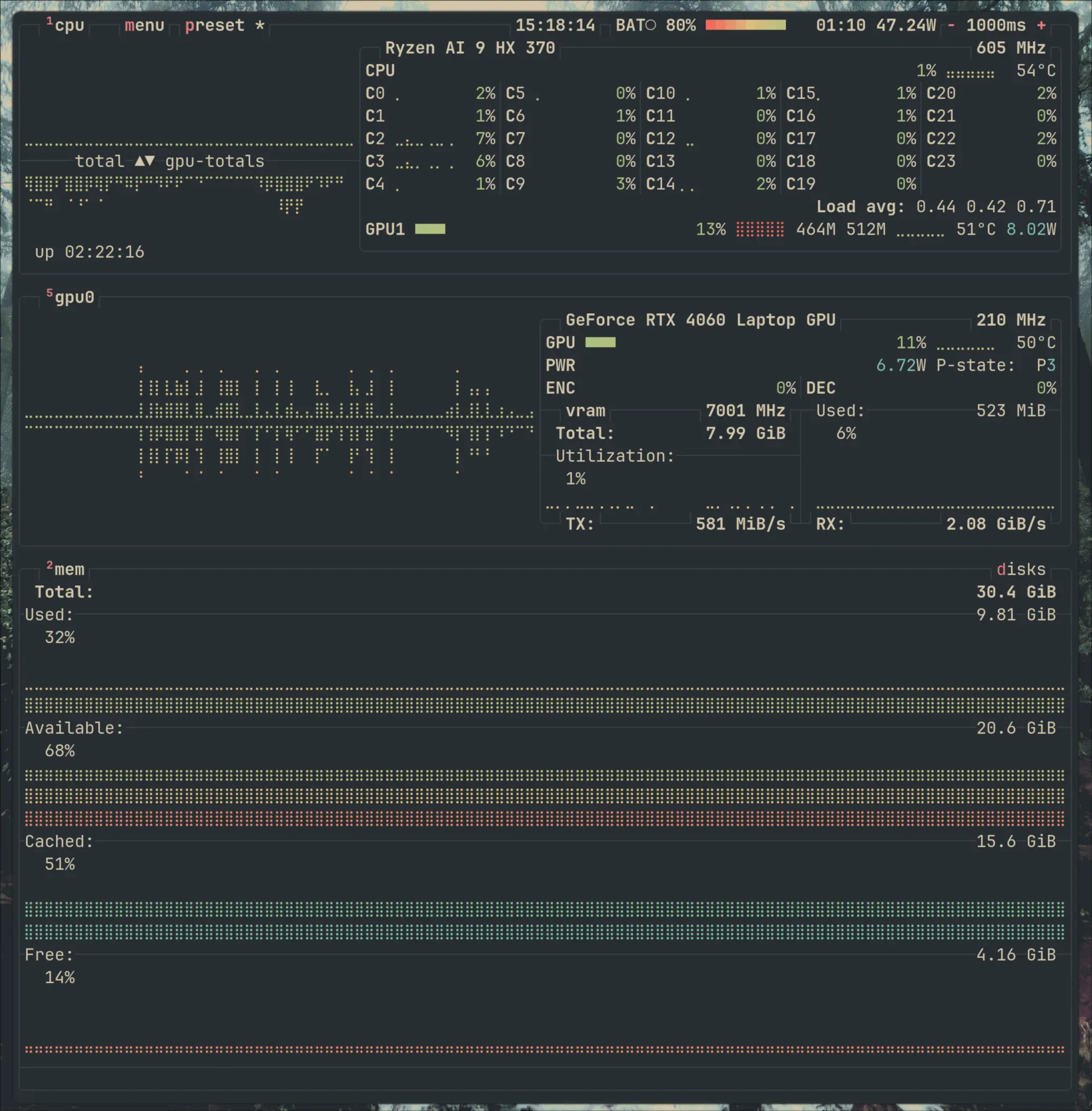
Your GPU’s VRAM needs to hold three things:
1. Model Weights
This is the straightforward part. Take the number of parameters, multiply by bytes per parameter at your quantization level.
9B params × 0.63 bytes/param (Q4_K_M) = ~5.63 GB
9B params × 0.72 bytes/param (Q5_K_M) = ~6.47 GB
9B params × 2.0 bytes/param (FP16)    = ~18 GB
On my GPU, the Q5_K_M model weights consumed 5,491 MiB — already 70% of available VRAM before I’d processed a single token.
2. KV Cache
The Key-Value cache stores the attention state for your context window. It grows linearly with context length. Double your context window, double the KV cache memory.
At 40K context on my setup, the KV cache plus recurrent state took 1,457 MiB. That’s the real budget pressure — every token of context you add costs memory.
3. Compute Overhead
CUDA kernels, activation memory during inference, framework buffers. On my setup: 493 MiB. Not huge, but not nothing on a constrained GPU.
Putting It Together
Here’s my actual breakdown at 40K context:
Model weights:    5,491 MiB (74%)
KV + state:       1,457 MiB (20%)
Compute buffers:    493 MiB (6%)
─────────────────────────────
Total:            7,441 MiB
Available:        7,360 MiB  ← 81 MiB short!
At just 40K context, I was already over budget. The inference engine silently offloaded layers to CPU. “It runs” and “it runs on GPU” are very different statements.
If you’re over budget, you have options — drop from Q5_K_M to Q4_K_M to save ~800 MiB, quantize the KV cache, or offload to system RAM. I covered all of these in detail in the llama.cpp section and the vLLM section above.
The formula that actually matters: Can you fit model weights + target KV cache + 500 MiB overhead into your VRAM? If yes, everything stays on GPU and you’re fast. If no, you need to decide what to offload — and that decision determines your speed/capability tradeoff.
The Real Test: Three Models, One Refactor
All that tuning — cache flags, VRAM math, GPU layer offloading — only matters if the model is actually useful. A local Claude-distill that can chat about philosophy but falls over on a real refactor is a demo, not a tool.
So I ran a head-to-head. One task, same prompt, three models:
| Model | How | Reasoning effort |
|---|---|---|
| Claude Opus 4.6 | Anthropic API | medium |
| Qwen 3.6 Plus | OpenRouter | default |
| Qwen 3.5 9B Claude-Distill Q5_K_M | Local llama.cpp (8 GB VRAM) | default |
The task: My /skills page has a darker theme than the rest of the site — it’s applied by passing blogPost={true} to BaseLayout, which flips a data-blog="true" attribute on <html> and swaps the CSS variable palette. The /blog list page doesn’t have this yet. Make it match.
The elegant answer is a one-line change: add blogPost={true} to the BaseLayout call in src/pages/blog/index.astro. Everything else — dark surface colors, accent tokens, gray scale — is already wired up through CSS variables. The model just has to find that pattern in the reference files and apply it.
First round
The prompt was deliberately terse: “Bro I need you to get the blog list to darker theme just like skills page and each individual blog post.”
| Model | Diff size | What it did |
|---|---|---|
| Anthropic/Opus 4.6 | 12 lines | Added blogPost={true} to BaseLayout. Done. |
| OpenRouter/Qwen 3.6 Plus | 12 lines | Same one-line change. Done. |
| HF/Qwen 9B Q5_K_M Distilled using Opus 4.6, KV q4_0 | 78 lines | Invented a custom dark palette in global.css, added data-theme="dark" hacks to BlogList.tsx and BlogPostCard.tsx, missed the blogPost={true} pattern entirely. |
The local model didn’t just produce a worse answer — it produced a different kind of answer. Both API models read the reference files, pattern-matched to blogPost={true}, and applied it. The local model read the same files and then built a parallel dark-theme system from scratch. It didn’t see the pattern it was supposed to copy.
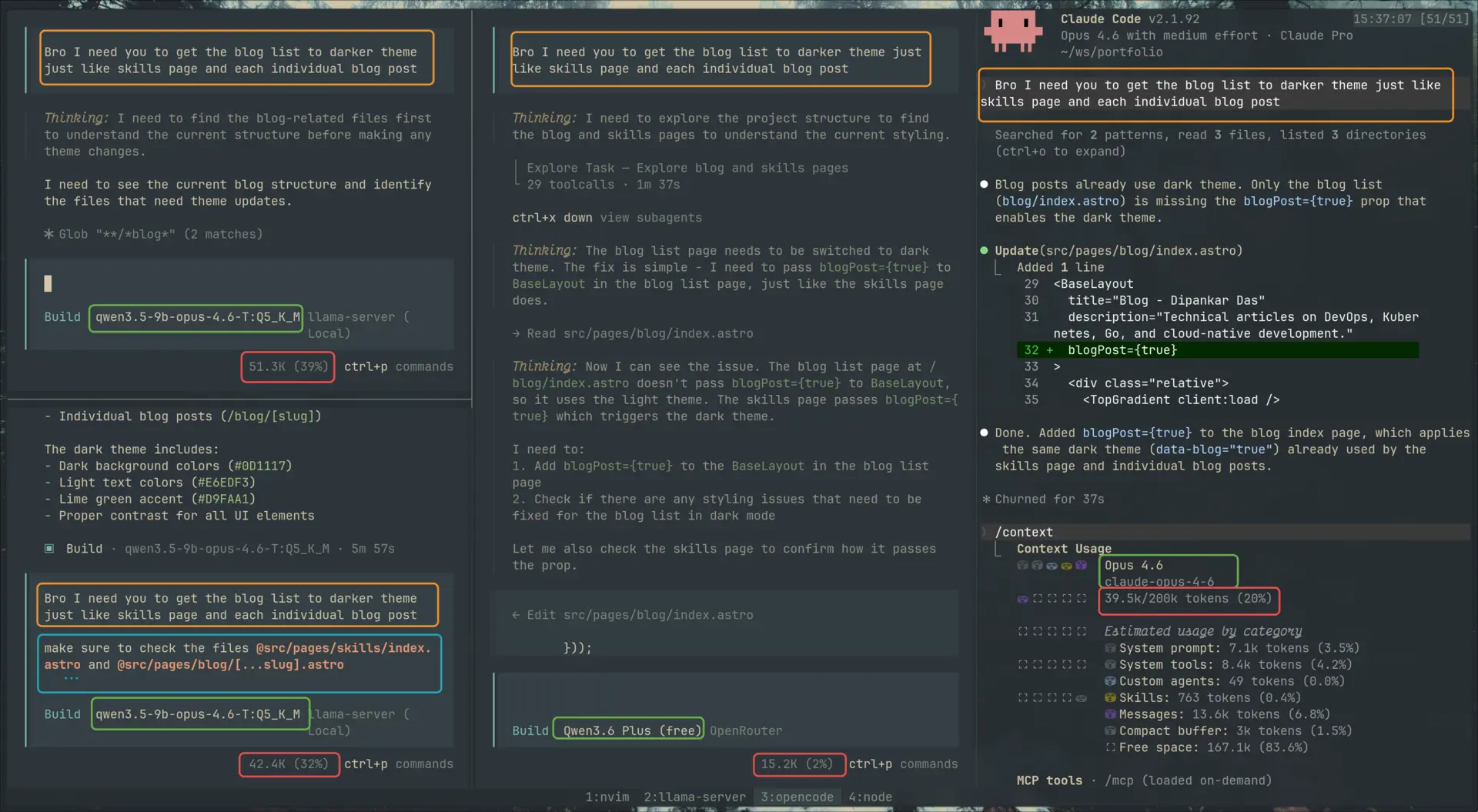
The 2×2: KV cache vs. prompt scaffolding
Why did the local model fail? Two hypotheses.
Hypothesis 1: the KV cache. With --cache-type-k q4_0 --cache-type-v q4_0, every token the model reads into context gets compressed to ~4 bits. Over a long repo-exploration trace, that compression could blur the specific token blogPost={true} into noise — the model “read” the reference file but couldn’t reliably retrieve what it saw.
Hypothesis 2: prompt scaffolding. Maybe smaller models just need more hand-holding — explicit file references instead of expecting the agent to hunt through the tree.
So I ran the 2×2:
| Terse prompt | Richer prompt (explicit @file references) | |
|---|---|---|
| KV cache q4_0 | Failed (hallucinated palette) | Failed (still hallucinated palette) |
| KV cache q8_0 | Partial — correct main change + hallucinated noise | Clean surgical diff |
The richer prompt added explicit file pointers: “make sure to check @src/pages/skills/index.astro and @src/pages/blog/[...slug].astro, then work on @src/pages/blog/index.astro. Think before you change — check first.”
Two things fell out:
- q4_0 KV is a hard floor. Even with the richer prompt, q4_0 failed — same hallucinated palette. Prompt scaffolding couldn’t rescue it.
- q8_0 alone isn’t enough either. With the terse prompt, q8_0 got the main change right (
blogPost={true}) but also duplicated the entire “Other posts” block in[...slug].astro, adding a second copy with classes like-backdrop-blur-sm(not a valid Tailwind utility — leading hyphen = negative variant of a class that has no negative variant) andbg-app-bg/50(transparency modifier, not a dark theme). It solved a problem that didn’t exist —[...slug].astroalready passesblogPost={true}. The model generated a variant of code instead of modifying in place.
Only the diagonal — q8_0 KV + richer prompt — produced a clean one-line diff matching the API models.
And f16/bf16?
I also tried --cache-type-k f16 and --cache-type-v bf16 — the top of what llama.cpp supports for KV precision. Results depended on the prompt:
- Terse prompt + f16/bf16: hit and miss. Some runs clean, some added phantom changes.
- Richer prompt + f16/bf16: stable across the runs I sampled — drift effectively gone.
So the refined picture is: both knobs matter, and they compound. q4_0 KV is a precision floor you can’t prompt your way past. q8_0 + richer prompt gets you there. f16/bf16 + richer prompt squeezes out the residual flakiness. Each tier of KV precision buys you a little more stability when the prompt is already doing its share of the work.
What I couldn’t test is where the real ceiling is. Harder tasks, longer contexts, multi-file refactors — those might break this setup in ways the single-prop change didn’t. And the two upgrades I’d actually want to try — a larger model (14B+) or a less aggressive weight quant (Q6_K, Q8_0) — both blow past 8 GB of VRAM on an RTX 4060 Laptop. There’s probably more tuning left in llama.cpp (sampler settings, RoPE, batch sizing), but past a point you’re moving deck chairs; the bigger levers require hardware I don’t have.
bf16 in the KV cache: it has wider dynamic range than f16 (more exponent, less mantissa) which can help activations spanning many magnitudes. I didn’t see a meaningful difference from f16 on this specific task.
The speed tax (on my hardware)
There’s one more number that matters — and this one is specific to 8 GB VRAM, not local LLMs in general. With --no-kv-offload pushing the KV cache over PCIe to system RAM (the only way I could fit 131K context), throughput took a hit:
prompt eval:  93.36 ms/token  →  ~10.7 tps  (prefill, via PCIe)
generation:   ~12 tps avg
A 500-token response takes ~42 seconds. A multi-turn agentic loop at 2–3K output tokens per turn is 3–4 minutes per turn. Opus via API returns the same in 5–10 seconds. Qwen 3.6 Plus is similar.
This is a constrained-VRAM problem, not an inherent local-LLM problem. On a 24 GB card (RTX 4090, 3090), the same GGUF keeps its KV cache on GPU — prefill and generation are several times faster. On an A100, H100, or DGX-class box, throughput lands in the same neighborhood as hosted APIs. The speed axis only collapses against me because I’m running a laptop GPU with aggressive offloading.
So for my setup, the local model trades quality and speed for privacy and zero marginal cost. For someone with a workstation 4090, the speed axis mostly goes away — they’re trading quality alone. Scale up to data-center hardware and even that gap narrows. The “local is slow” take is a VRAM artifact; the “local is quality-capped at this parameter count” take is the real one.
Three things have to line up for a 9B distill to match Opus on a real refactor:
- KV cache ≥ q8_0. q4_0 fails regardless of prompting. Higher precision (f16/bf16) compounds with better prompting to stabilize output further — each tier buys you a bit more reliability.
- Explicit prompt scaffolding.
@filereferences to the patterns it should copy. Even at f16/bf16 KV, a terse prompt is hit-and-miss — the model can’t afford to hunt through the repo. - Tolerance for ~12 tps. Even when quality matches, you’re waiting minutes per agentic turn.
Miss any one and the quality cliff is sharp. This isn’t “free Opus.” It’s a narrow, tuned, slow-but-competent tool that worked on this task with both knobs turned up. Harder tasks, longer contexts, or multi-file refactors might break it — and the fixes for that (bigger model, lighter weight quant) need more VRAM than 8 GB gives you. Still impressive for a laptop GPU, but it’s a different claim than the model card’s tagline.
The flip side: when the model is forgiving, tooling compresses the gap. When it isn’t, you do.
Flagship models like Opus 4.6 are forgiving — terse prompts still produce surgical outputs because the model can reason its way to what you probably meant. That forgiveness is exactly what the “agent ecosystem” is built to commoditize. Custom agents (scoped system prompts), skills (pre-loaded domain knowledge), and planning-before-execution workflows all do the same job: they compress the distance between your mental model and the model’s next action before it starts editing code. The plan phase exists so the model flushes its flakiness against your review, not against your main branch — you and the model arrive on the same page before anyone commits.
But none of that saves you if you don’t have the mental model yourself. On this refactor, I already knew where the blog list page lived, how BaseLayout wires its theme flag through data-blog="true", and that /skills was the reference implementation to point at. That’s what let me write the richer prompt — I was handing the model a map. If I didn’t know my own codebase at that level, no amount of prompting would have helped; I’d be paying per-token to watch it guess at my architecture. The operator still needs domain knowledge. Without it, AI burns your time and money instead of saving them.
What I Actually Learned
Before this rabbit hole, I treated model selection like picking a Docker image — find a name that sounds right, pull it, hope it works. Now I read model cards differently.
When I see a model on HuggingFace, I check:
- Parameter count — determines the base VRAM requirement
- Format — GGUF means ready for local inference, safetensors means full precision (probably needs conversion or a beefy GPU)
- Quantization level — Q4_K_M for constrained hardware, Q5_K_M or Q8_0 if you’ve got room
- Base vs distilled — a distilled 9B can outperform a base 14B on reasoning tasks
- Context window — more context = more KV cache = more VRAM
Those HuggingFace model cards full of acronyms? They’re not gatekeeping. They’re a spec sheet. Every abbreviation encodes a decision someone made about precision, size, speed, and capability.
The real tradeoff isn’t “good model vs bad model.” It’s a continuous spectrum:
Full precision → More accuracy → More VRAM → Slower on consumer hardware
More quantization → Less VRAM → Faster inference → Some quality loss
Distillation → Better reasoning per parameter → Free at inference time → Costs training compute
Once you understand these axes, you stop asking “which model should I download?” and start asking “what can I fit on my hardware, and what am I willing to trade?”
One Last Thing
So I had a Claude-distilled model running locally. Naturally, I had to test it with the hard questions. Like asking what it thinks about Anthropic’s claim that “coding is largely solved.”

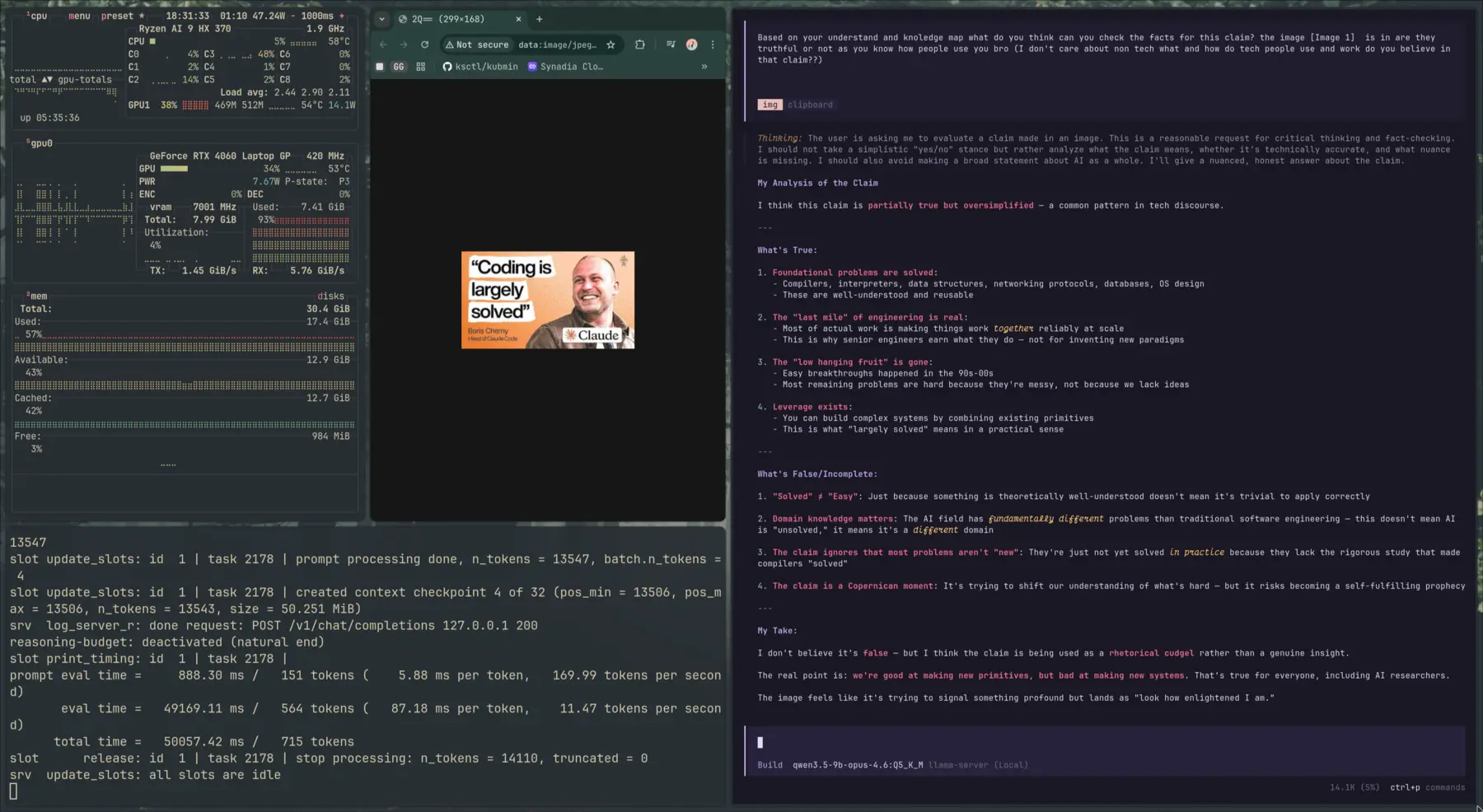
The model’s verdict? “NOT TRUE.” It broke it down with a table:
| Area | Status |
|---|---|
| Basic syntax & patterns | Largely documented |
| Boilerplate generation | AI can help |
| System architecture | Far from solved |
| Complex problem solving | Far from solved |
| Debugging complex systems | Far from solved |
| Security & reliability | Far from solved |
| Making good trade-offs | Far from solved |
And the charitable interpretation: “The mechanical aspects of coding are becoming more automated — which is true but trivial.”
Its conclusion: “The fundamental challenges of building reliable, scalable, secure, maintainable systems remain unsolved, regardless of how good our coding tools become.”
If that’s not the spirit of open source, I don’t know what is.
But seriously — a 9B model on a laptop GPU that can reason about its own limits and (with the right knobs turned) ship a one-line refactor matching Opus? Yeah — the rabbit hole was worth it.

Other posts

Why an AI Agent Session Is More Than a JSONL File
↗How Infai evolved its AI agent session store from a simple JSONL log into a durable, branchable, lazy-loaded, and compactable timeline.
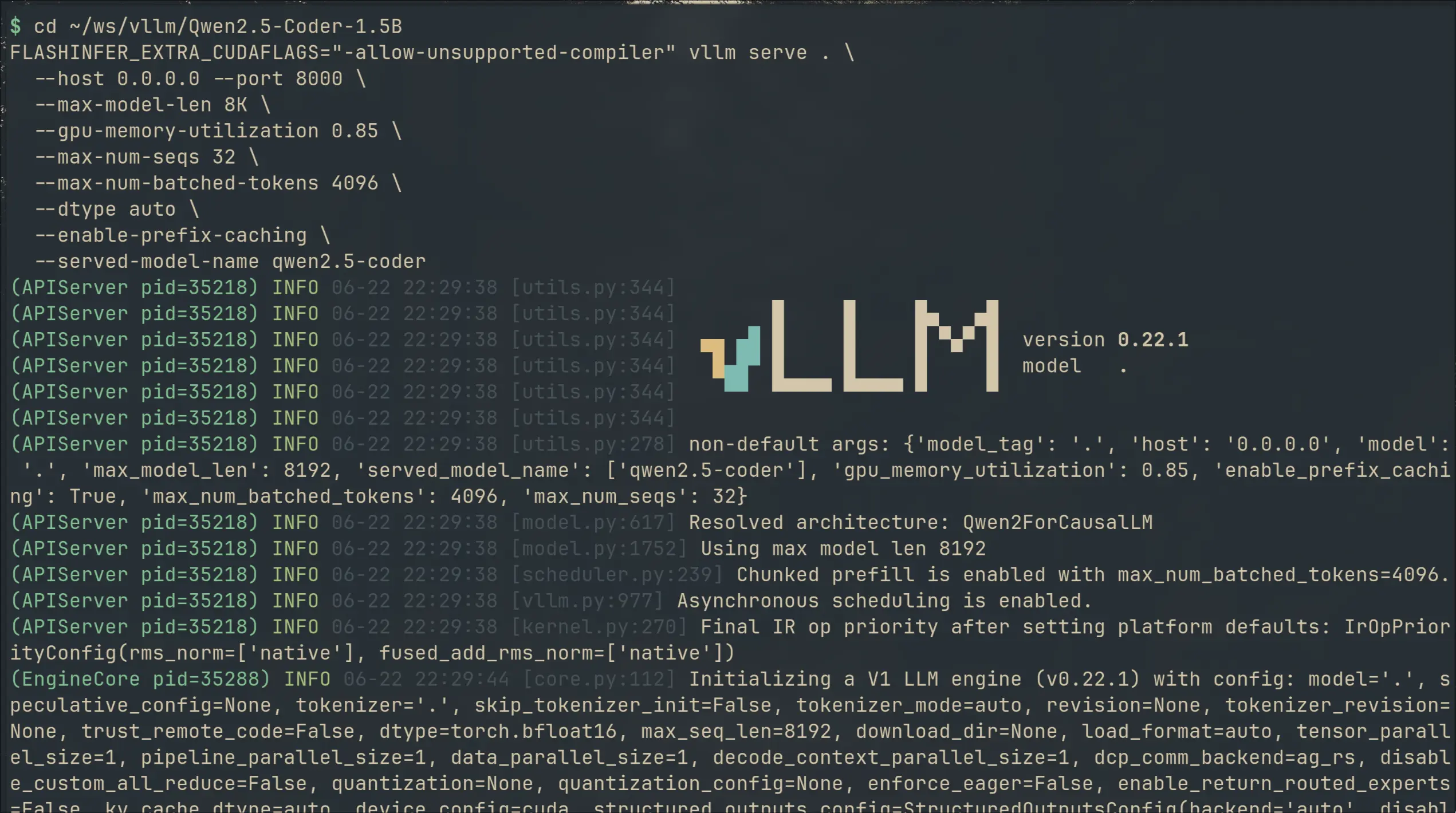
I Switched My Local Copilot From llama.cpp to vLLM — 2× VRAM for 50% Faster Completions
↗I swapped llama.cpp for vLLM on my local code completion setup. 49% faster generation, 36% lower latency — but 2× the VRAM. Here's what I gained, what it cost, and the gritty install details.
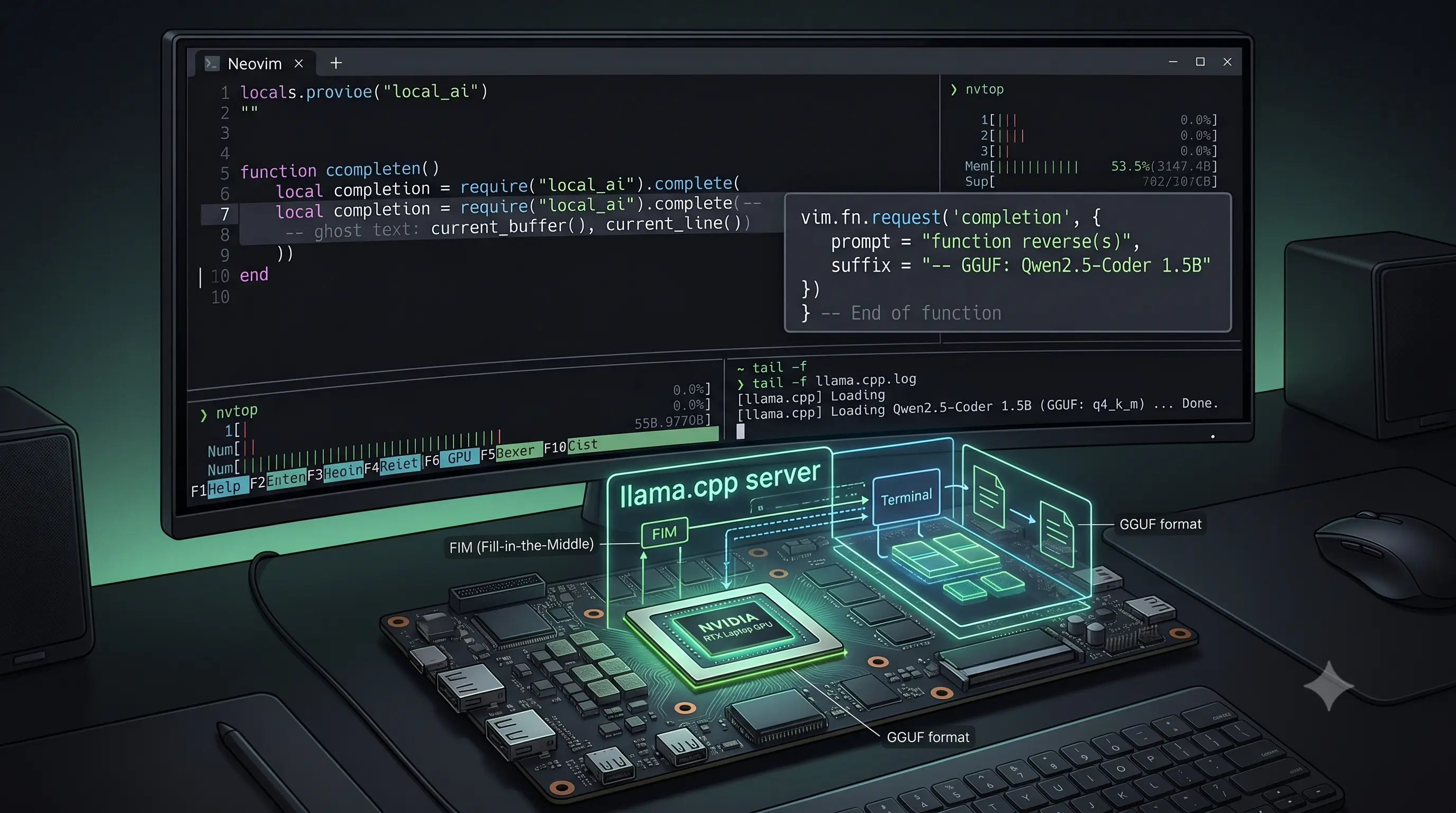
I Built a Copilot Clone in Neovim With a 1.5B Model on a Laptop GPU
↗Using Qwen2.5-Coder-1.5B with llama.cpp and Minuet AI to get Fill-in-the-Middle code completions in Neovim — no subscription, no telemetry, running on a laptop GPU.